
Project Manager
Start every job with a plan the whole team can follow.
Projects with task lists, a board, a timeline, milestones and files, sprints across projects, and templates for the work you repeat. For IT firms, agencies and consultants who deliver work for clients.
- Task lists, board and timeline
- Milestones, discussions and files
- Sprints with story points and burndown
- Templates for repeat jobs
- Hourly or fixed-price billing
Why it matters
A won deal turns into an email thread, a spreadsheet of tasks and a folder somewhere on a shared drive. Every new client onboarding is planned from scratch, nobody can see which jobs are slipping until the client asks, and when the project ends you piece the invoice together from memory because the time was never tied to the work.
-
Jobs that don't slip quietly
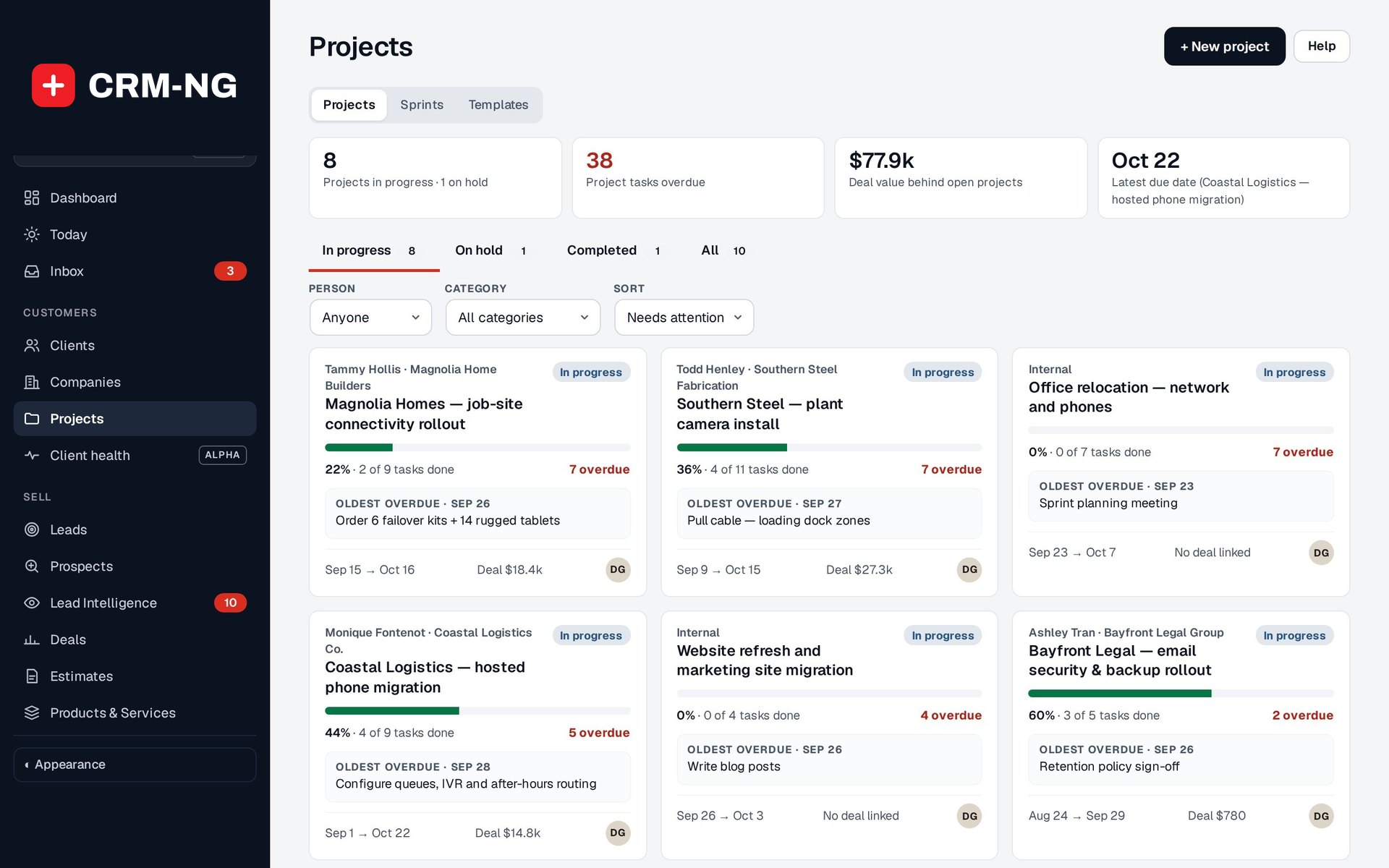
The project list puts the jobs that need attention first, with overdue tasks counted and the oldest one named, so you step in before the client notices.
-
Repeat work, set up in minutes
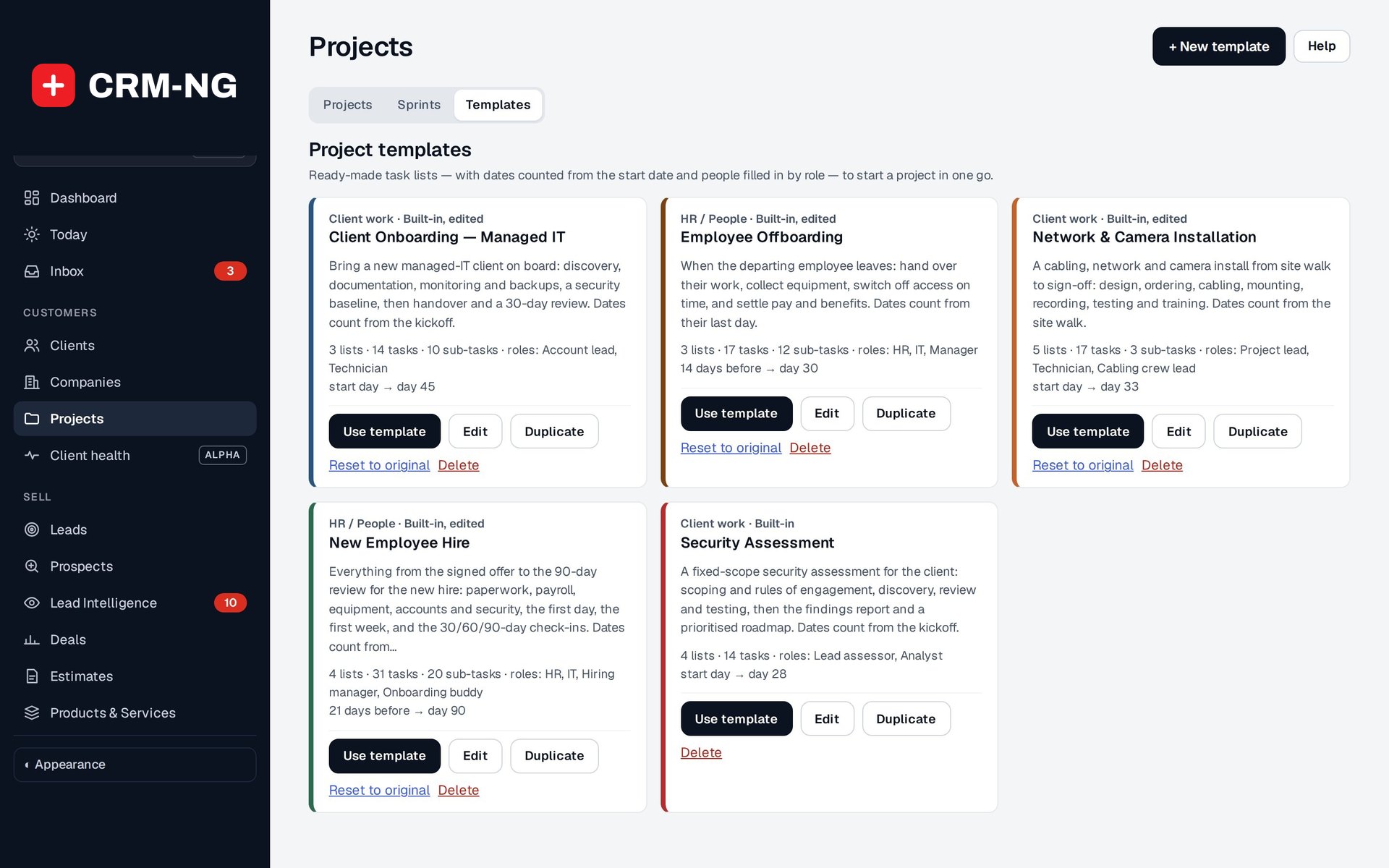
Templates start a client onboarding, an installation or a security assessment with every list, task, role and date already in place, counted from the start date you choose.
-
Delivery that gets invoiced
Time logged on tasks lands on the project, and hourly, fixed-price or milestone charges turn into draft invoices linked back to the work, so nothing is billed twice or forgotten.
How it works
-
Start the project
Create it from a template or from scratch, or let a won deal start it for you. Set the client, owner, people, dates and billing model.
-
Plan the work
Add lists, tasks, subtasks and milestones, set dates and who waits on whom, and check the plan on the board, timeline or calendar.
-
Run the team's weeks
Pull tasks from every project into a sprint with a goal, track it on the burndown chart, and keep discussions and files with the project.
-
Finish and bill
Review time and milestones under Time & billing, create the draft invoice, and mark the project complete when the work is delivered.
What Project Manager does
Agencies, consultants and IT firms delivering projects.
-
Plan it your way
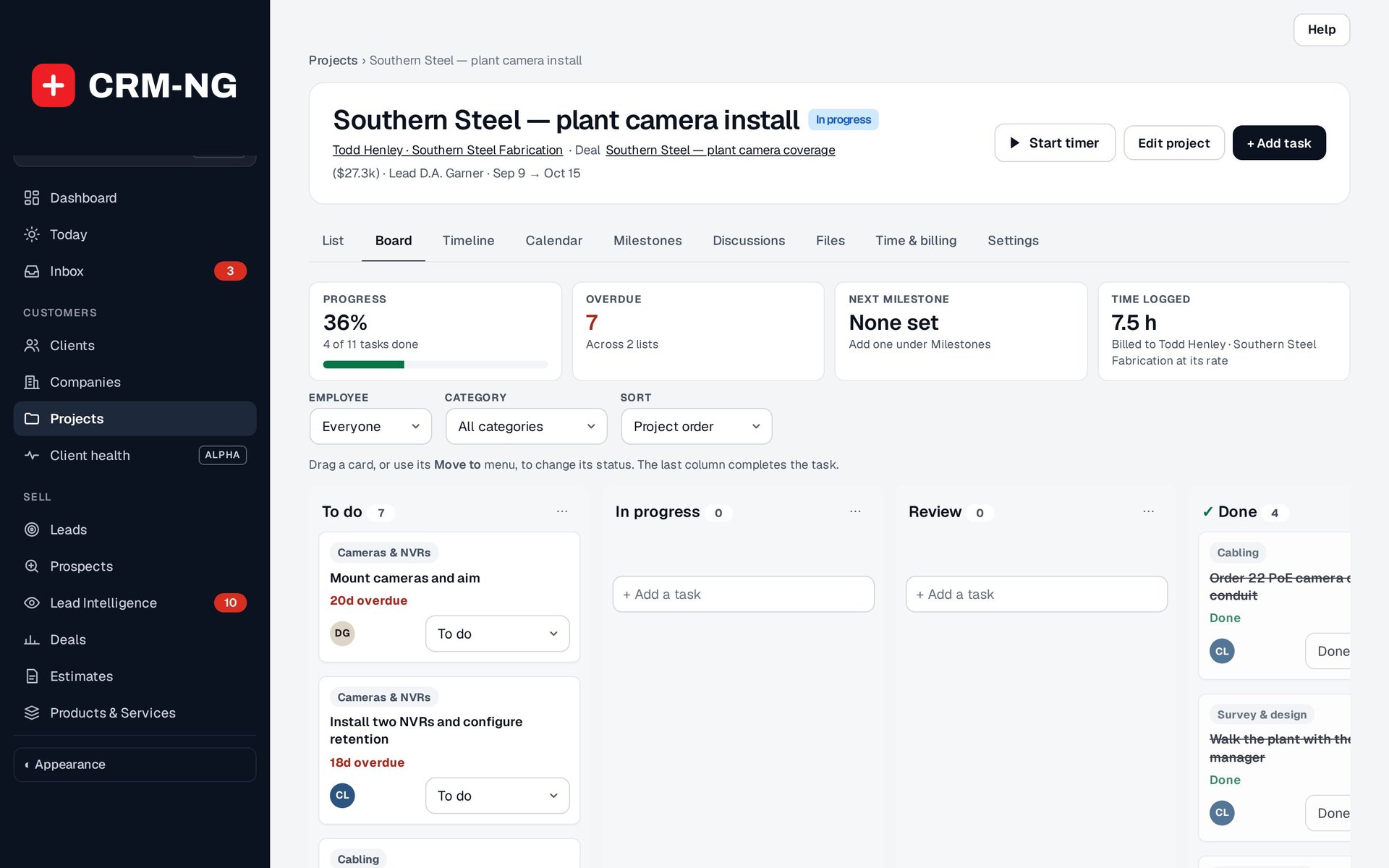
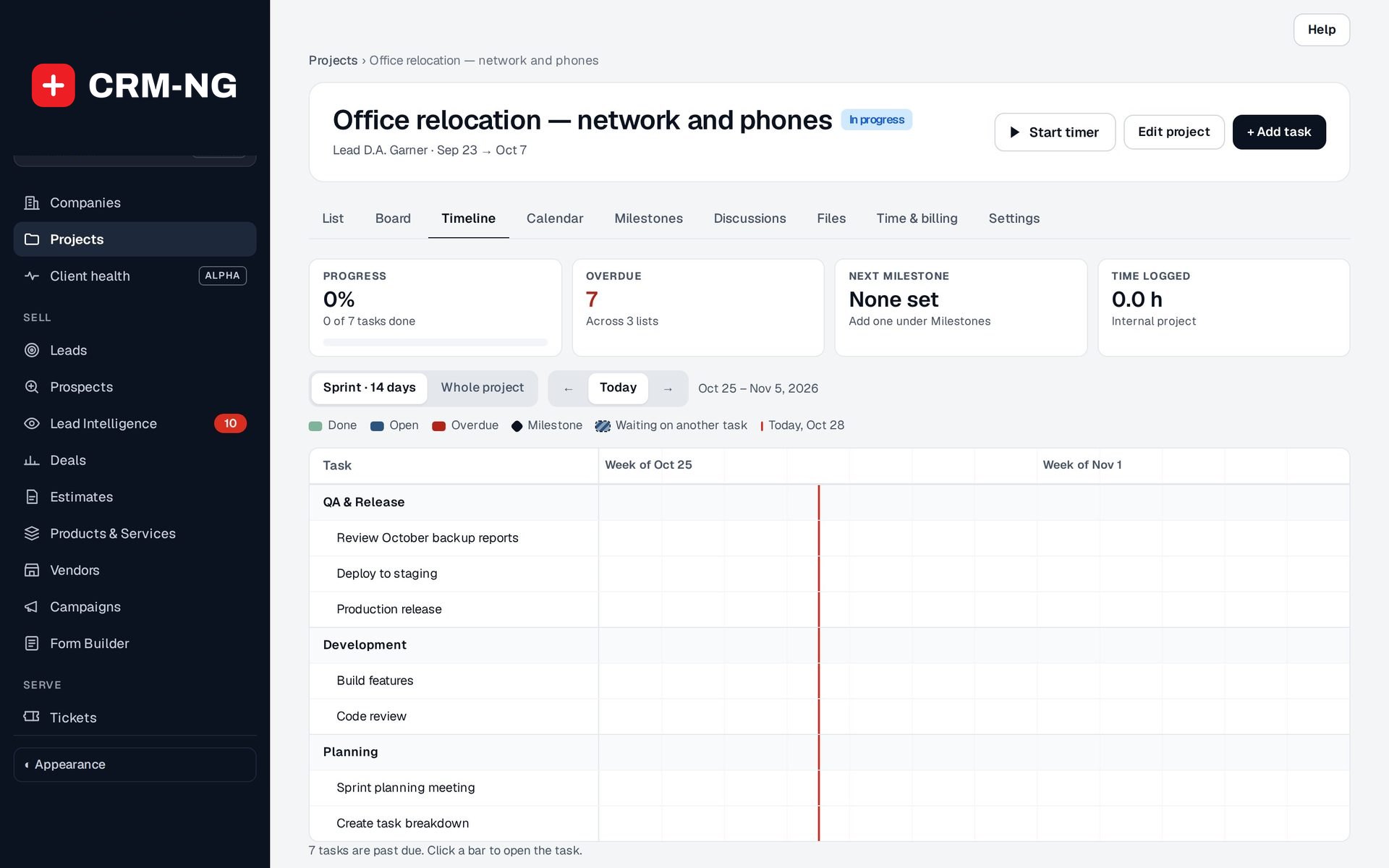
Task lists, a drag-and-drop board, a timeline and a calendar, all over the same tasks.
- Tabs: List, Board, Timeline, Calendar, Milestones, Discussions, Files, Time & billing, Settings
- Subtasks, assignees, start and due dates and estimates
- Board columns you set up for your own stages
-
A portfolio that shows what needs attention
Every project as a card with its progress, overdue count, oldest overdue task, dates and linked deal.
- In progress, On hold, Completed and All
- Filter by person and category
- Sort by Needs attention, due date, progress, start date or client
- Tiles for projects in progress, tasks overdue and deal value behind open projects
-
Milestones and dependencies
Know what has to finish before the next step can start.
- Waits-on links between tasks, with loops refused
- Blocked work hatched on the timeline
- Milestones as delivery checkpoints, with an amount when you bill by milestone
-
Sprints across projects
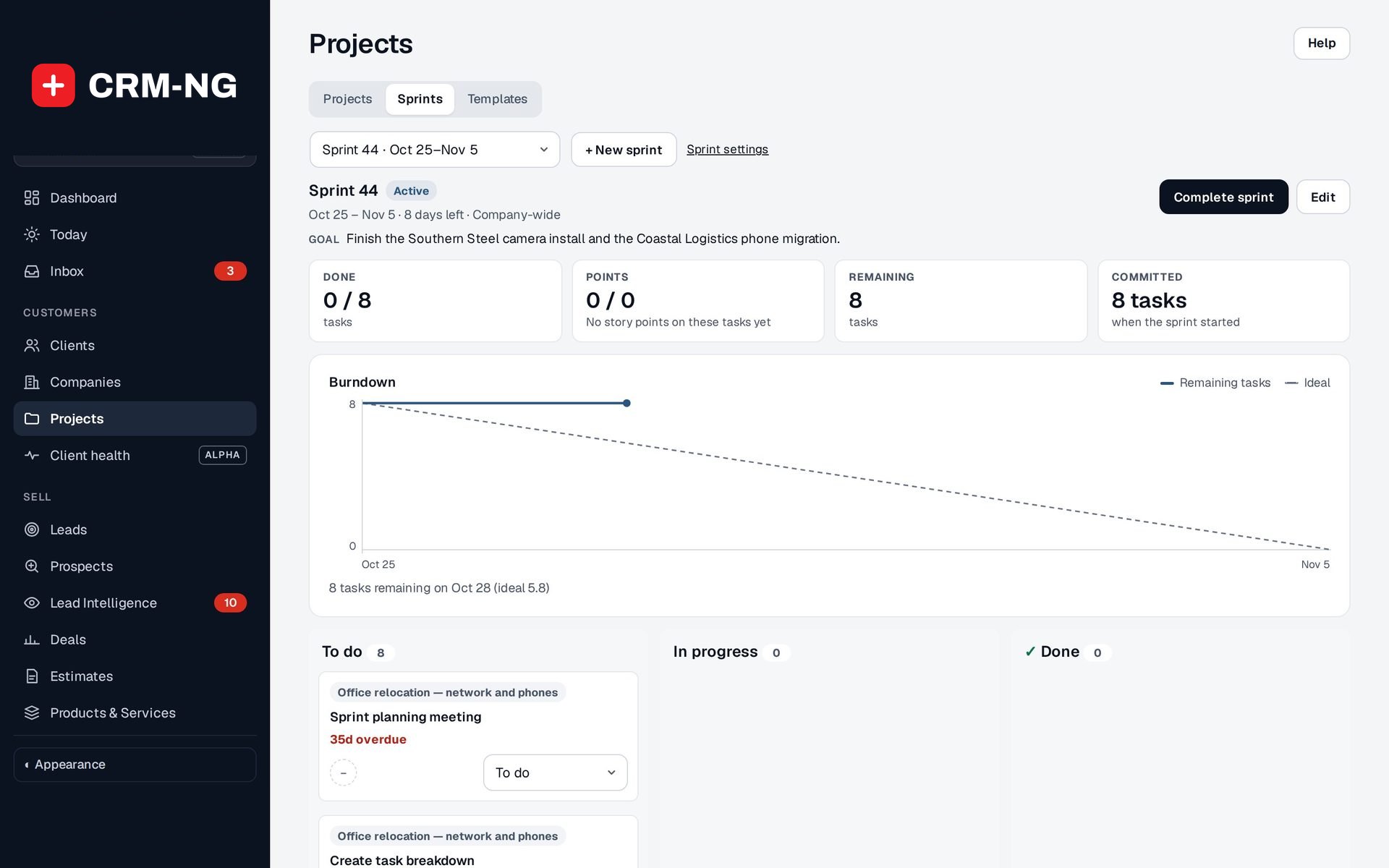
Plan the team's next two weeks from every project at once, with story points and a burndown chart.
- Company-wide, department or team sprints
- A goal, a start and end date, and the commitment recorded at the start
- Velocity from the last three completed sprints
-
Templates
Client onboarding, security assessments, installations: start them with the tasks, roles and dates already in place.
- Built in: Client Onboarding (Managed IT), Network & Camera Installation, Security Assessment, New Employee Hire, Employee Offboarding
- Roles such as Technician or Account lead, filled per project
- Weekend dates moved to Friday, Monday or left as they are
-
Discussions and files
Keep the conversation and the documents with the project, not in email.
- Project-level discussions
- Files with protected downloads for authorised staff
- Scripts, executables and other active content refused on upload
-
Time and billing
Bill by the hour or at a fixed price, and see time logged against the budget.
- Hourly, Fixed price, By milestone or Internal
- Fixed-price and milestone projects can also bill hours
- Budget hours to compare with time logged
- Draft invoices linked back to the time and milestones they bill
-
From deal to delivery
A project can be linked to the deal that won it, and can start automatically when the deal is marked Won.
- Deal value shown on the project card
- The deal's activity notes when the project starts
- Projects listed on the deal
See it in action
Go deeper
- Lists, boards & timelinesEvery project has a list, a board, a timeline and a calendar over the same tasks, with milestones and dependencies that show what is holding things up.Read more →
- SprintsSprints gather tasks from several projects and the backlog into one period with a goal, a burndown chart and a clear end.Read more →
- Templates & project billingTemplates turn your best process into a ready plan; Time & billing turns the work into a draft invoice.Read more →
Who it is for
-
An IT provider or MSP
Onboard each new managed-IT client from the same template (discovery, documentation, monitoring and backups, security baseline, handover and a 30-day review) and bill the onboarding at a fixed price while still logging the hours.
-
An installer or systems integrator
Run network and camera installations from site walk to sign-off, with the cabling crew lead and technicians filled in by role and dates counted from the site walk.
-
A consultancy or agency
Deliver website builds, assessments or campaigns in sprints across several clients, keep client discussions and files with each project, and bill by milestone.
-
Any business that hires
Use the New Employee Hire and Employee Offboarding templates so paperwork, equipment, accounts and check-ins happen on time, with dates counted from the start or last day.
Works with the rest of CRM-NG
- CRM
Projects belong to a client, and the client's record lists their projects.
- Sales
A won deal can start a project automatically, the deal shows its projects, and the deal value appears on the project card.
- Service Desk
Project time uses the Service Desk timer and rates, so the same client rate and discount apply to project and ticket work.
- Accounting
Time & billing creates draft invoices from hours, a fixed price or completed milestones, linked back so they are not billed twice.
- Calendar
Open milestones, project due dates and open tasks show on the Projects team calendar.
- HR
HR templates fill in the employee's name and start or leaving date when a hire or offboarding project is created.
Questions
Can I keep using my own process?
Yes. Build your own templates with the lists, tasks, roles and date offsets you already use, or save a finished project as a template. Changing a template never rewrites projects already made from it.
Do I have to run sprints?
No. Sprints are optional. Many teams use projects with lists, a board and due dates, and add sprints only when they want to plan the whole team's next two weeks together.
How is progress worked out?
From the tasks in the project: tasks done out of the total. Check milestones and the agreed scope as well before calling a job finished.
Can clients see the project?
Projects are a staff workspace. Project files are protected downloads for authorised staff and do not become client portal attachments automatically.
What happens if dates move?
Drag the project's bar on the timeline to change its dates, and choose whether open tasks and milestones shift with it before you confirm.
See Project Manager running on your own data.
Every module runs on CRM-NextGen Cloud: we set it up and run it for you. Beta members get the first invites and hear pricing first.