
Service Desk
Every request gets an owner, a target and a clear next step.
Tickets from the portal or by email, service plans with response and resolution targets, and a timer that bills at the right rate. Built for IT providers and MSPs, and for any business that supports its customers.
- Tickets from the portal and email
- SLA targets on business hours
- Service plans: Tiers or Memberships
- Time tracking with the right rate
- Reports, CSAT and a service catalogue
Why it matters
Requests arrive in a shared inbox, on the phone and in a text to whoever the client knows best. Nobody is sure who picked up which one, the client who pays for faster service waits behind everyone else, and the hours your team spent fixing things never quite make it onto the invoice. At the end of the month you cannot say how quickly you responded, because the only record is a trail of email.
-
Nothing slips through
Every request becomes a ticket with an owner, a priority and a deadline. Queues for unassigned work and tickets at risk of missing their target show what needs attention before a client has to chase you.
-
Promises you can keep
Each client's service plan sets which priorities they can raise, which hours count and how fast you respond. Your team sees the real deadline on every ticket, so the agreement you sold is the service you deliver.
-
Support time that gets billed
Time logged on a ticket carries the right rate and the plan's discount, included monthly hours are checked off before billing, and the rest goes onto a draft invoice with a link back to the work.
How it works
-
Set your terms once
Enter your business hours and holidays, create your service plans (Bronze, Silver, Gold or your own names) and give each company its plan. Clients inherit their company's plan unless you set an exception.
-
Requests come in
Clients open tickets in the client portal or by email to your connected support inbox, or your team logs a phone call with + New ticket. Each one picks up the client, the company and a deadline from their plan.
-
Your team works the queue
Technicians start from My tickets, Unassigned or SLA at risk, reply to the client or leave internal notes, link related tickets and start the timer while they work.
-
Resolve, bill and learn
Resolve the ticket, optionally send a satisfaction survey, bill the time the plan does not cover, and review response and resolution results on the Reports tab.
What Service Desk does
IT firms, MSPs and any business that supports its customers.
-
Tickets from anywhere
Clients open tickets in the portal or by email. Replies thread back to the right ticket, and internal notes stay internal.
- Portal tickets, a public ticket form and a connected support inbox
- Keep [Ticket #123] in the subject and an email reply joins the existing ticket
- Unknown senders are labelled for review instead of becoming tickets
- + New ticket opens a quick form for phone calls and walk-ins
-
Targets that mean something
Priority sets the response and resolution targets, counted on your business hours and holidays.
- Priorities P1 to P4, with a suggestion from impact and urgency
- Separate first response and resolution deadlines on every ticket
- Business-hours or 24/7 calendars per plan
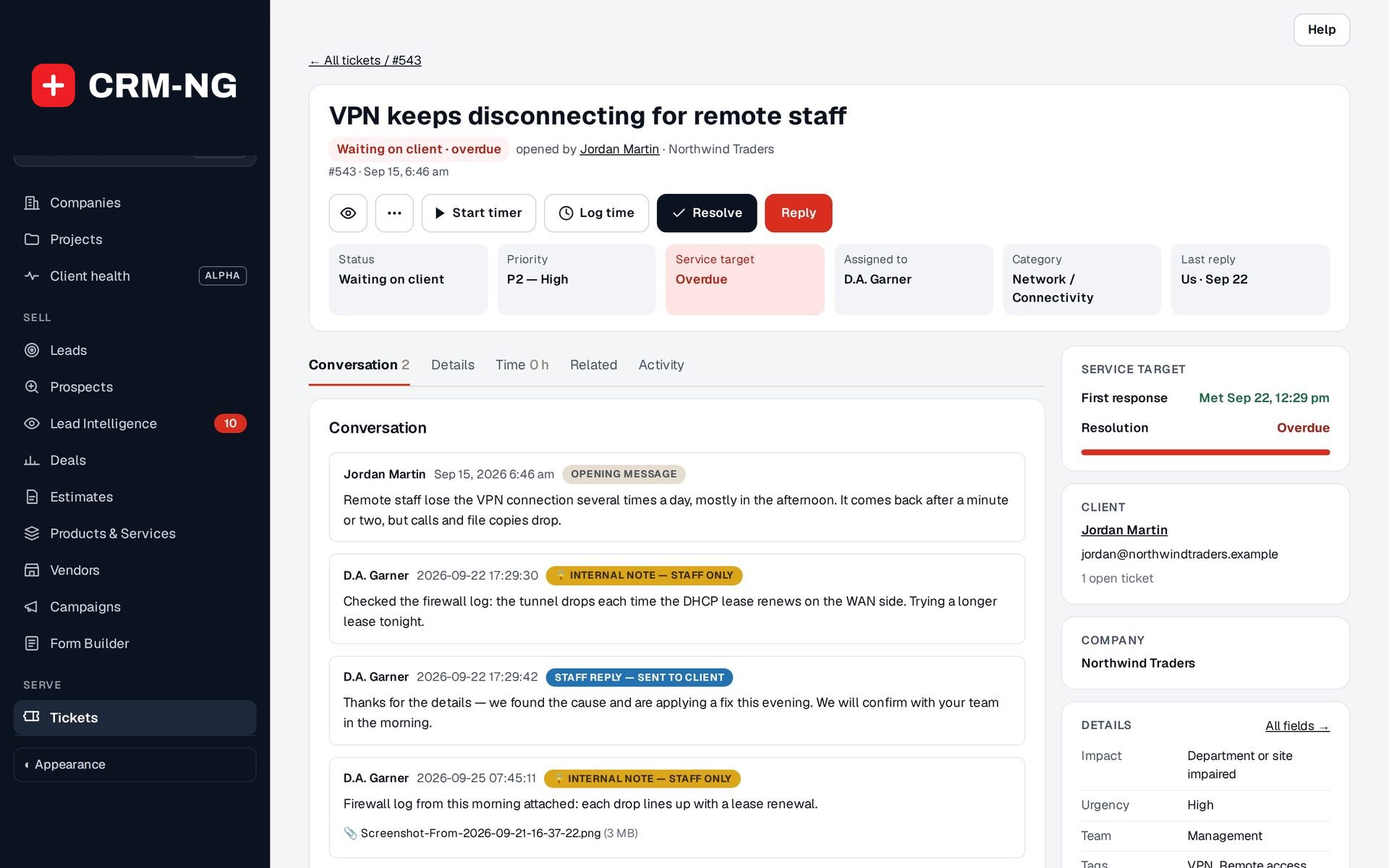
- A Service target card on the ticket shows what was met and what is overdue
-
Service plans
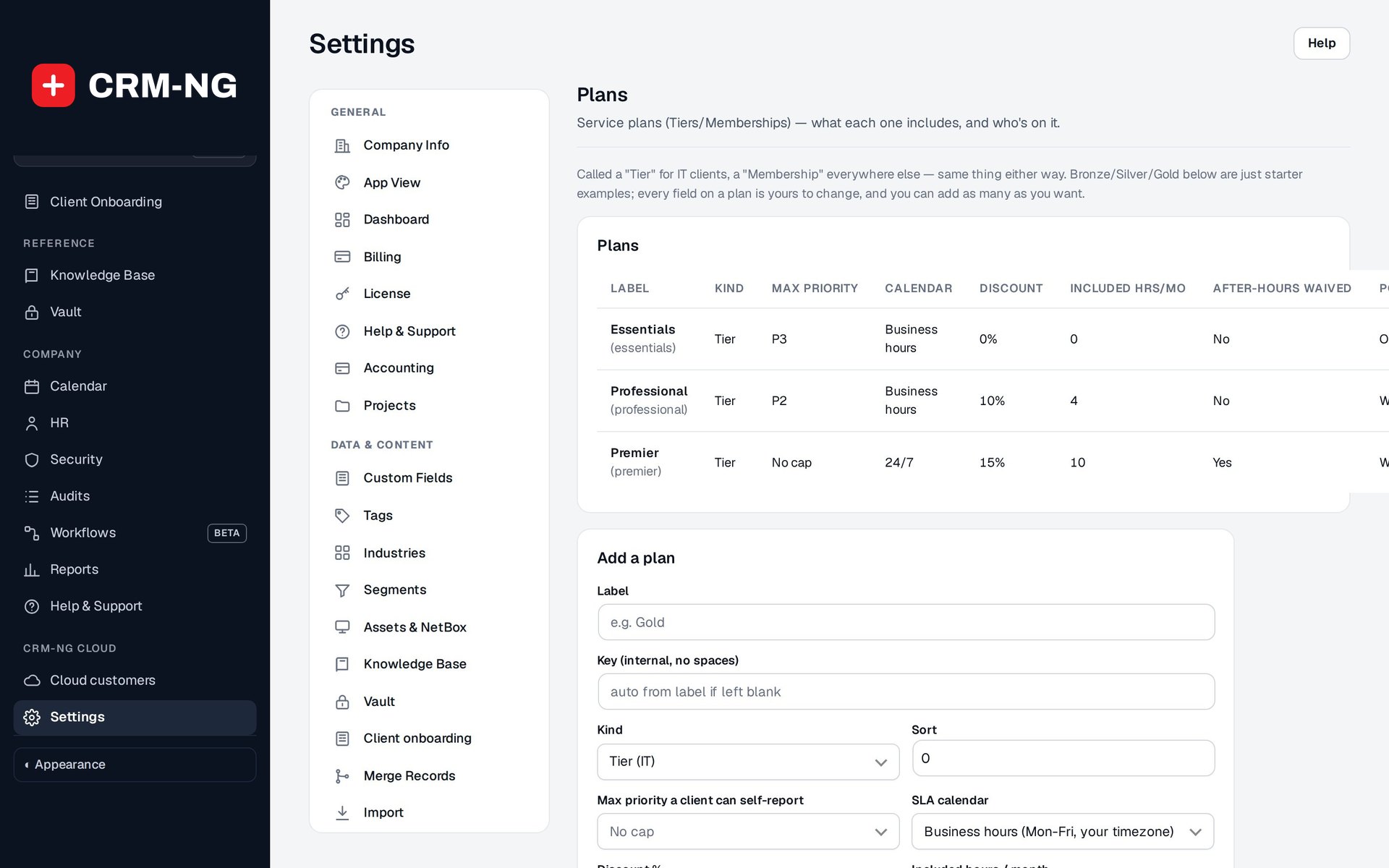
Bronze, Silver, Gold or your own: priority caps, discounts, included hours each month and after-hours terms.
- Called a Tier for IT clients and a Membership for everyone else
- Max priority a client can self-report
- Discount, included hours per month and after-hours waiver
- Set on the company, with per-client overrides
-
Time that bills itself
Start the timer on a ticket. The rate is picked for you (client, then staff, then default) and the plan discount applied.
- Start timer and Log time buttons on every ticket
- After-hours rate, waived where the plan says so
- Included-hours ledger reviewed before invoicing
- Billed entries show the invoice they went on
-
Conversations with the right audience
One composer for Public Reply and Internal note, clearly labelled, so troubleshooting details never reach the client by accident.
- Staff reply, sent to client and Internal note, staff only labels in the thread
- Attachments checked by their contents, not just their name
- Watchers follow a ticket without owning it
- Ticket emails carry a reply-to address for your support inbox
-
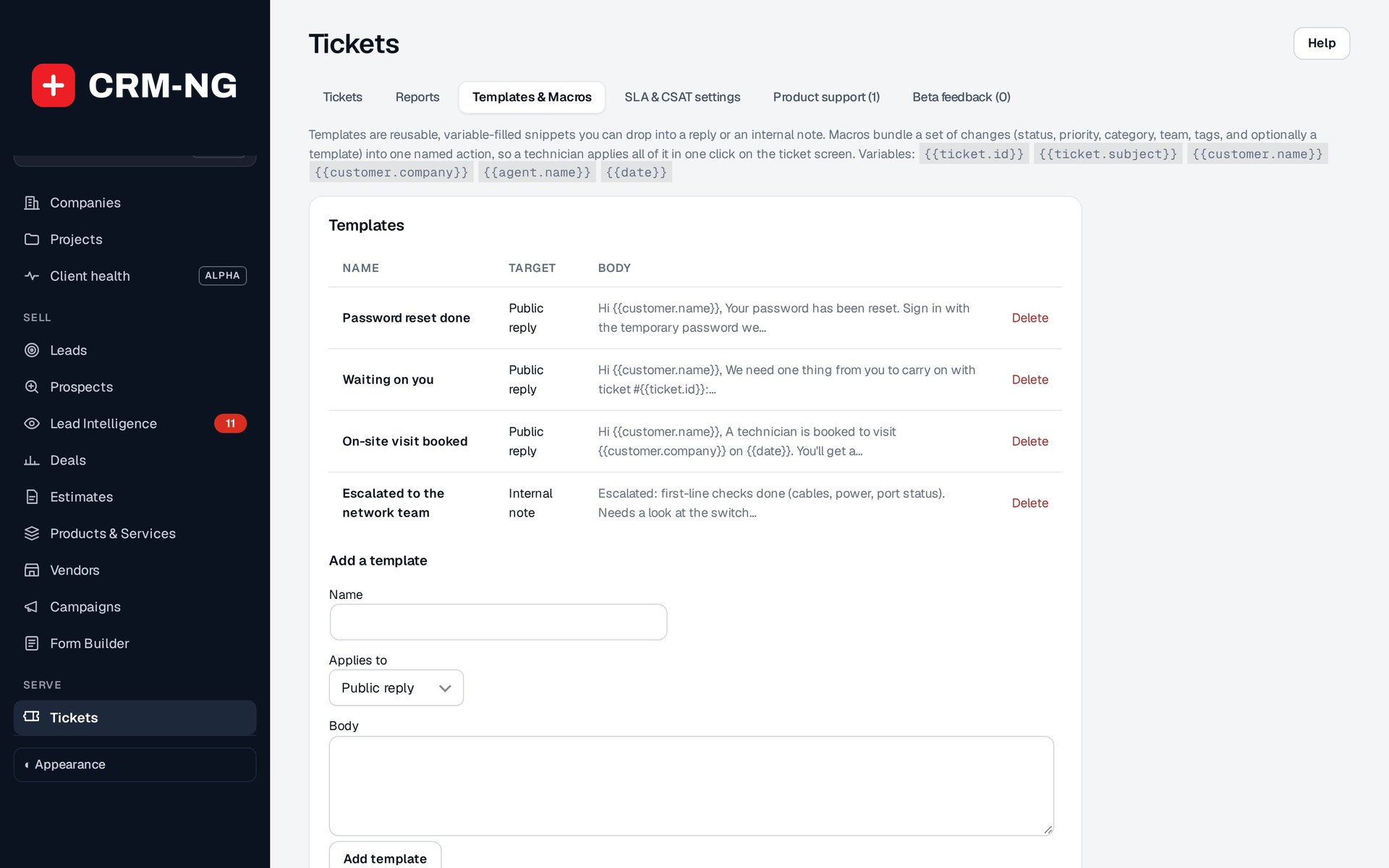
Templates and macros
Save the replies you write every week, and bundle the clicks you repeat into one macro.
- Templates: reusable replies and notes with fill-in variables
- Macros: set status, priority, category, team and tags in one step
- A macro can add a template as it runs
- Every macro change is logged like a manual edit
-
Linked and merged tickets
Group many reports of one outage under a parent incident, record what is blocking what, and merge true duplicates.
- Parent and child tickets that keep their own conversations
- Predecessor and dependency links, with loops refused
- Merge a duplicate from the ticket's More menu
- Related tab shows linked tickets, equipment and work
-
A service catalogue
Standard requests such as a new starter or a software install, with optional approval from the client's manager.
- Clients pick from Common requests in the portal
- Optional sign-off from a manager, executive or the requester's supervisor
- A request waiting for approval is not a ticket yet and stays out of your queues
- Approved requests become ordinary tickets
-
Queues and reports
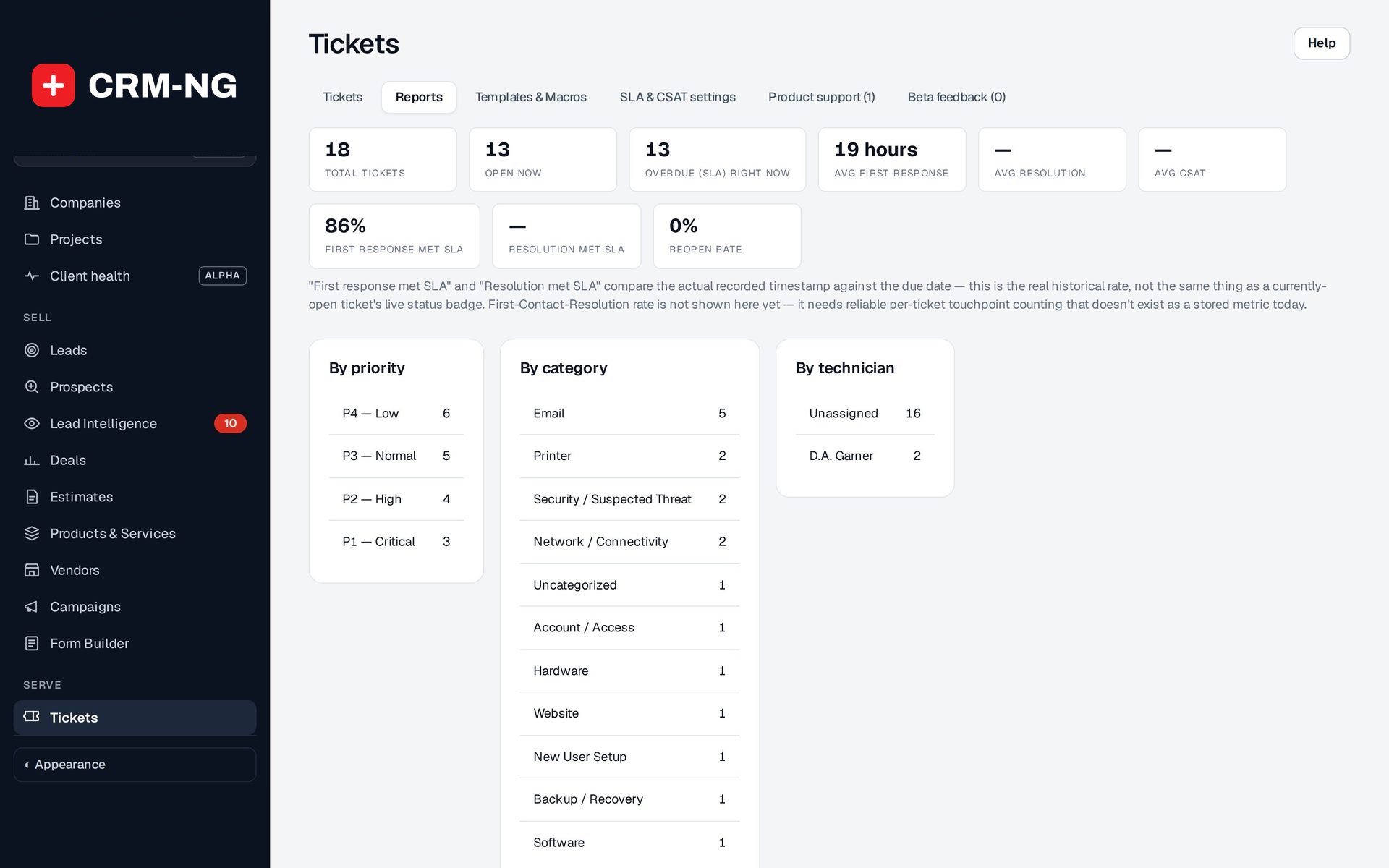
My tickets, unassigned, SLA at risk, waiting on client; reports by priority, category and technician.
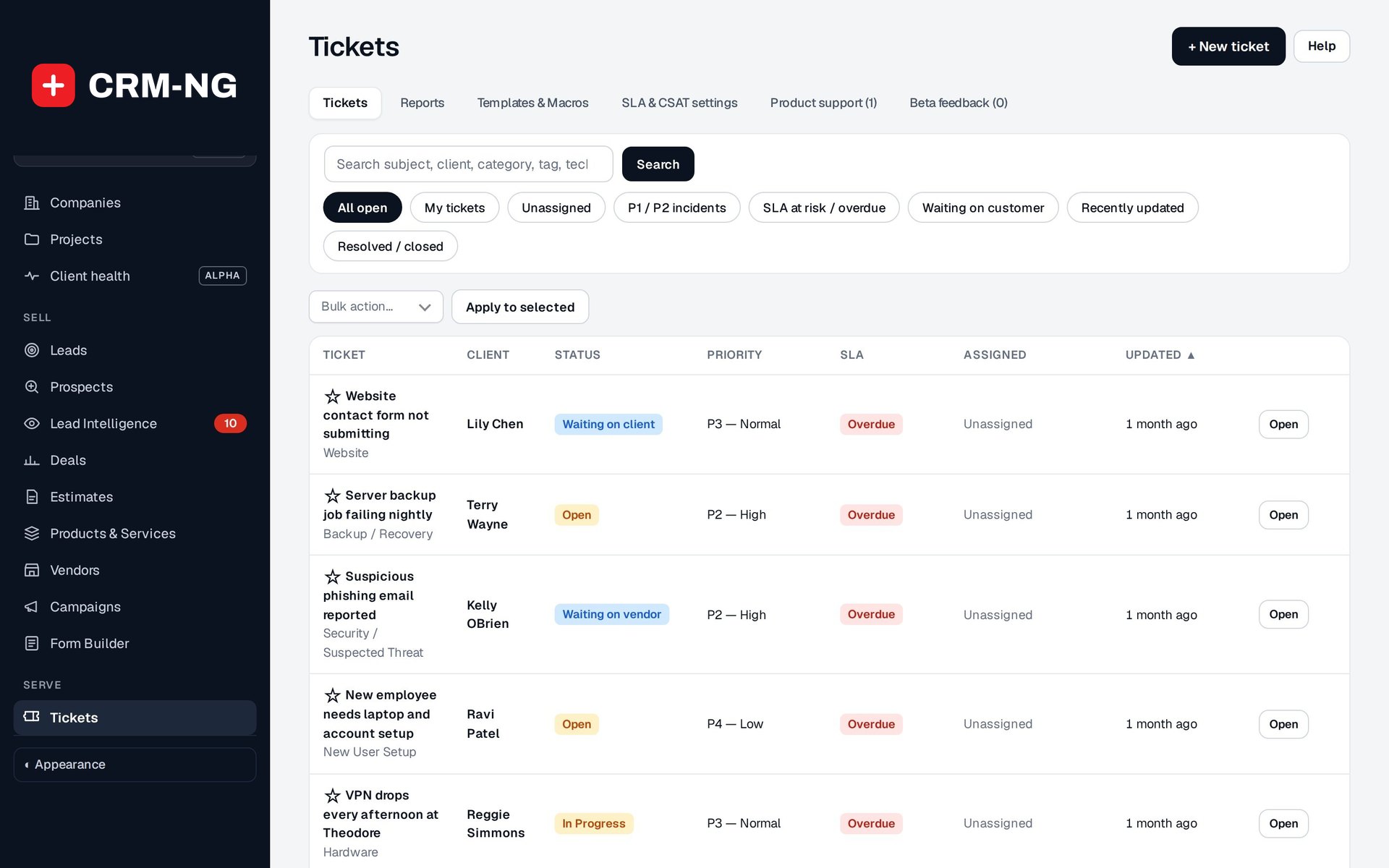
- Quick views: All open, My tickets, Unassigned, P1 / P2 incidents, SLA at risk / overdue, Waiting on customer, Recently updated, Resolved / closed
- First response met SLA and Resolution met SLA, from recorded times
- Average first response, average resolution, reopen rate and average CSAT
- Bulk actions on selected tickets
See it in action
Go deeper
- Tickets & conversationsQueues that show what needs attention, a ticket page with the whole story, and replies that always go to the right audience.Read more →
- SLAs & service plansService plans hold the terms you agree with each client; SLA targets turn those terms into a real deadline on every ticket.Read more →
- Time, rates & included hoursA timer on every ticket, rates chosen for you, included hours checked before billing, and draft invoices that link back to the work.Read more →
Who it is for
-
An IT provider or MSP
Sell Essentials, Professional and Premier support with different priority caps and response times, cover a monthly allowance of hours in the top plans, and bill the rest. Outage reports from several users sit under one parent incident, and the client's equipment shows on the ticket.
-
A professional-services firm
An accounting or legal practice can handle client questions as tickets with a clear owner, keep internal discussion out of the client's view, and bill advisory time at each client's own rate.
-
A trades or field business
Callouts come in as tickets, urgent ones rise to the top, and with Field Service a technician is sent from the ticket with the travel and on-site time landing back on it.
-
A membership or subscription business
Call your plans Memberships, give members a discount and included hours, and let them follow their requests in the portal instead of calling for updates.
Works with the rest of CRM-NG
- CRM
Tickets belong to the client and company records you already keep; each customer's tickets appear in their Transactions and on their timeline.
- Field Service
Schedule a site visit from a ticket; when the technician checks out, the travel and on-site time are logged on that ticket at the right rate.
- Web Integration & Portals
Clients open and follow tickets, request catalogue items and approve their staff's requests in the client portal.
- Accounting
Unbilled time goes onto a draft invoice with a link back to each entry, so work is not billed twice.
- Project Manager
The same timer and rates are used for project work, so ticket time and project time are billed the same way.
- Knowledge Base
Articles can be suggested to clients in the portal before they open another ticket.
Questions
Can clients email us instead of using the portal?
Yes. Connect your Gmail support inbox and new messages from known clients become tickets; replies with the ticket number in the subject join the right ticket. Messages from unknown senders are labelled for your team to review rather than opened as tickets automatically.
Do I have to use Bronze, Silver and Gold?
No. They are starter examples. Name your plans after your own agreements, add as many as you need, and call them Tiers or Memberships depending on your business.
What happens if a client marks everything as urgent?
Their plan sets the highest priority they can report. A client on a plan capped at P3 can ask for P1, but the ticket's effective priority follows the cap, and your staff can still raise it when it really is an emergency.
How are deadlines counted overnight and at weekends?
Plans on business hours count only your open days and hours, skipping the holidays you list, so a ticket logged just before closing continues the next working day. Plans on 24/7 count around the clock.
Can clients see our internal notes?
No. Internal notes are marked staff only in the conversation and never appear in the client portal or in emails to the client. Only Public Replies go to the client.
Do unused included hours roll over?
No. Included hours are a monthly allowance. Your team decides which entries the allowance covers in the included-hours ledger before the remaining time is invoiced.
See Service Desk running on your own data.
Every module runs on CRM-NextGen Cloud: we set it up and run it for you. Beta members get the first invites and hear pricing first.