
Sales
From first conversation to signed quote, without losing the thread.
A deal pipeline you can drag, quotes built from your price list, and prospect lists you can import and work through, all tied to the customer record.
- Deal board, forecast and win rate
- Quotes and estimates as PDFs
- Products & Services price list
- Prospect lists with import and scoring
- Vendors and referral partners
Why it matters
Most small firms sell from memory. Opportunities live in an inbox, quotes are retyped in a word processor, and nobody is sure which proposal was sent, which expired or what the pipeline is really worth. Cold-call lists sit in spreadsheets full of duplicates, and when a deal goes quiet nobody notices until the client has signed with someone else.
-
Win more of what you quote
Every deal carries a next step and a due date, and the dashboard flags the ones that are overdue, past their closing date or gone quiet, so follow-ups happen while the client is still interested.
-
Quotes out the same day
Build an estimate from your price list in minutes, send it as a PDF, let the client accept it in the portal and turn it into an invoice without retyping a line.
-
A forecast you can believe
Each deal's value is weighted by its probability, so you see what is likely to close and when, not just a pile of hopeful numbers.
How it works
-
Set up your price list and stages
Add your products and services with prices, costs and tax, and set how long estimates stay valid and your default terms.
-
Work your prospects
Import a list of target businesses, let the score rank them, and record each call or email until one is ready to talk.
-
Track the deal
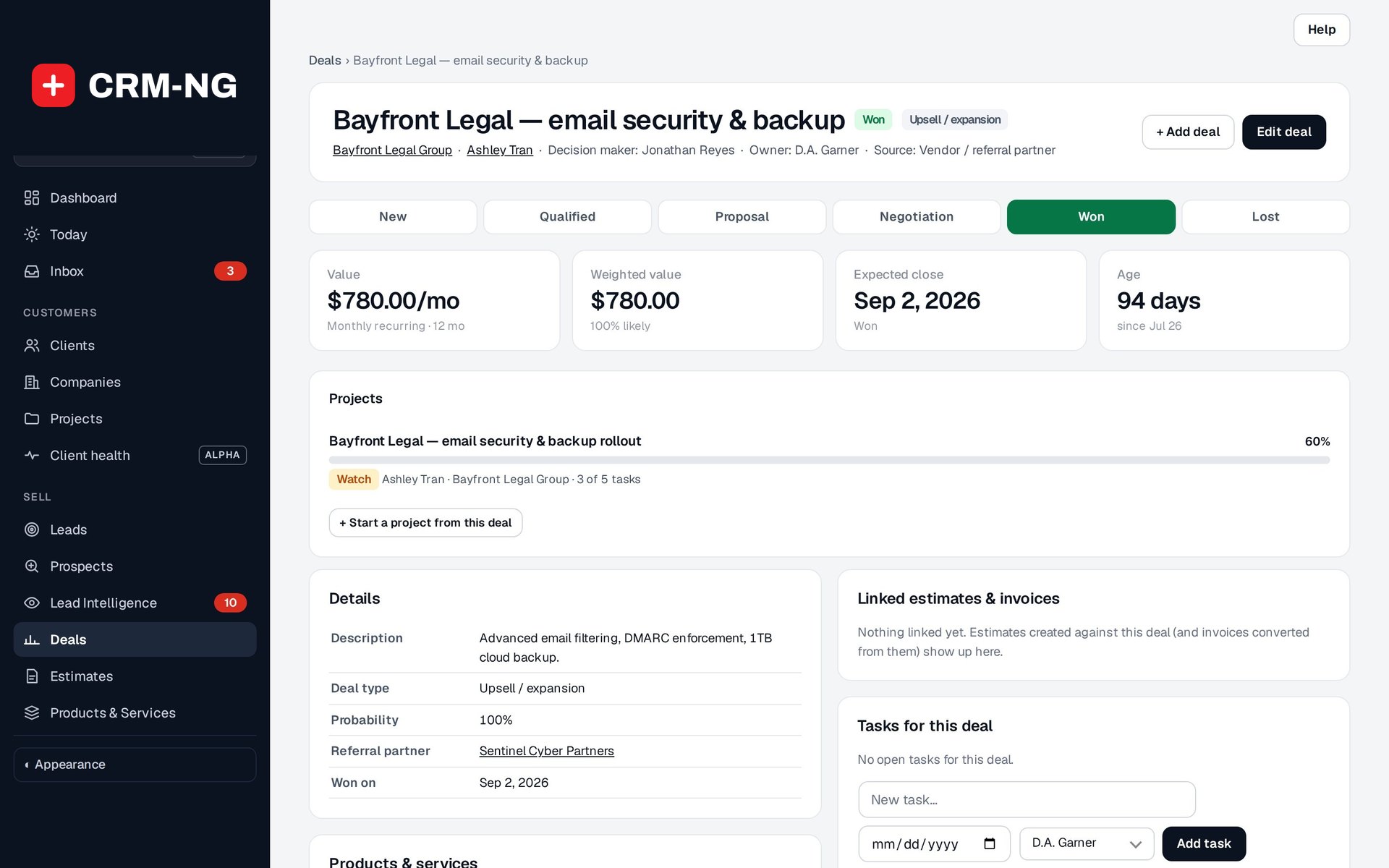
Create a deal with its value, probability, closing date and next step, then drag it across the board as the conversation moves.
-
Quote and close
Turn the deal's items into an estimate, send it, and when the client accepts in the portal, convert it to an invoice and hand the work to delivery.
What Sales does
Anyone who quotes before they work: IT firms, agencies, trades and consultants.
-
A pipeline you can see
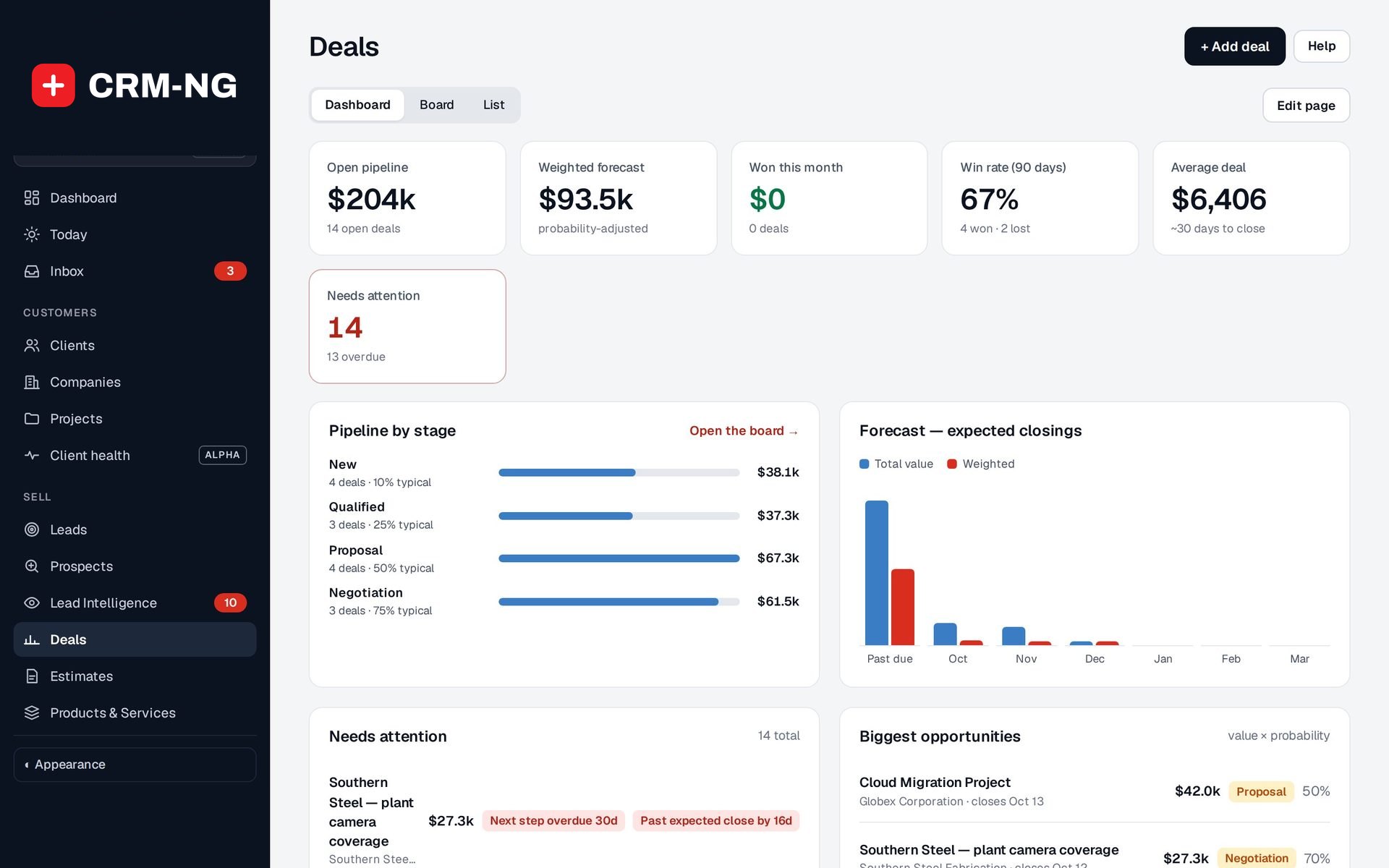
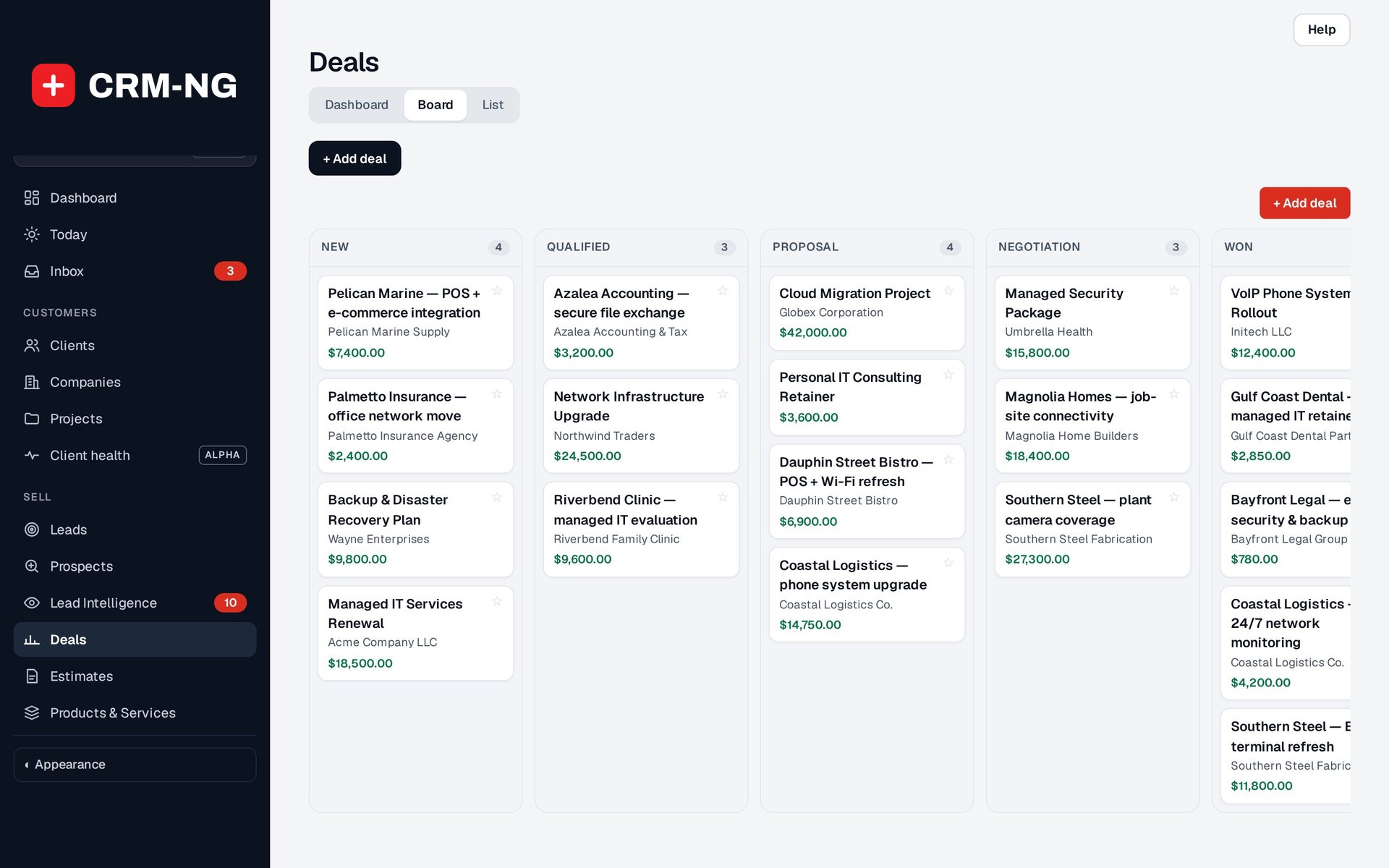
Stages, probabilities and a weighted forecast. Drag a deal to its next stage and the numbers update.
- Dashboard, Board and List views of the same deals
- Tiles: Open pipeline, Weighted forecast, Won this month, Win rate (90 days), Average deal
- Forecast of expected closings by month, total and weighted
- Default stages New, Qualified, Proposal, Negotiation, Won and Lost
-
Deals that do not go quiet
Overdue next steps and stalled deals surface on the dashboard.
- Needs attention flags: next step overdue, past expected close, no activity in 14 days, no next step set
- Biggest opportunities ranked by value times probability
- Won and lost reasons recorded on each deal
-
Everyone on the deal
Add the people involved besides the main contact, each with their role, and the products the client is considering.
- Roles: decision maker, champion, influencer, technical, billing, user
- Line items from Products & Services; once added, their total is the deal value
- Create an estimate from the deal's items in one click
-
Quotes from your price list
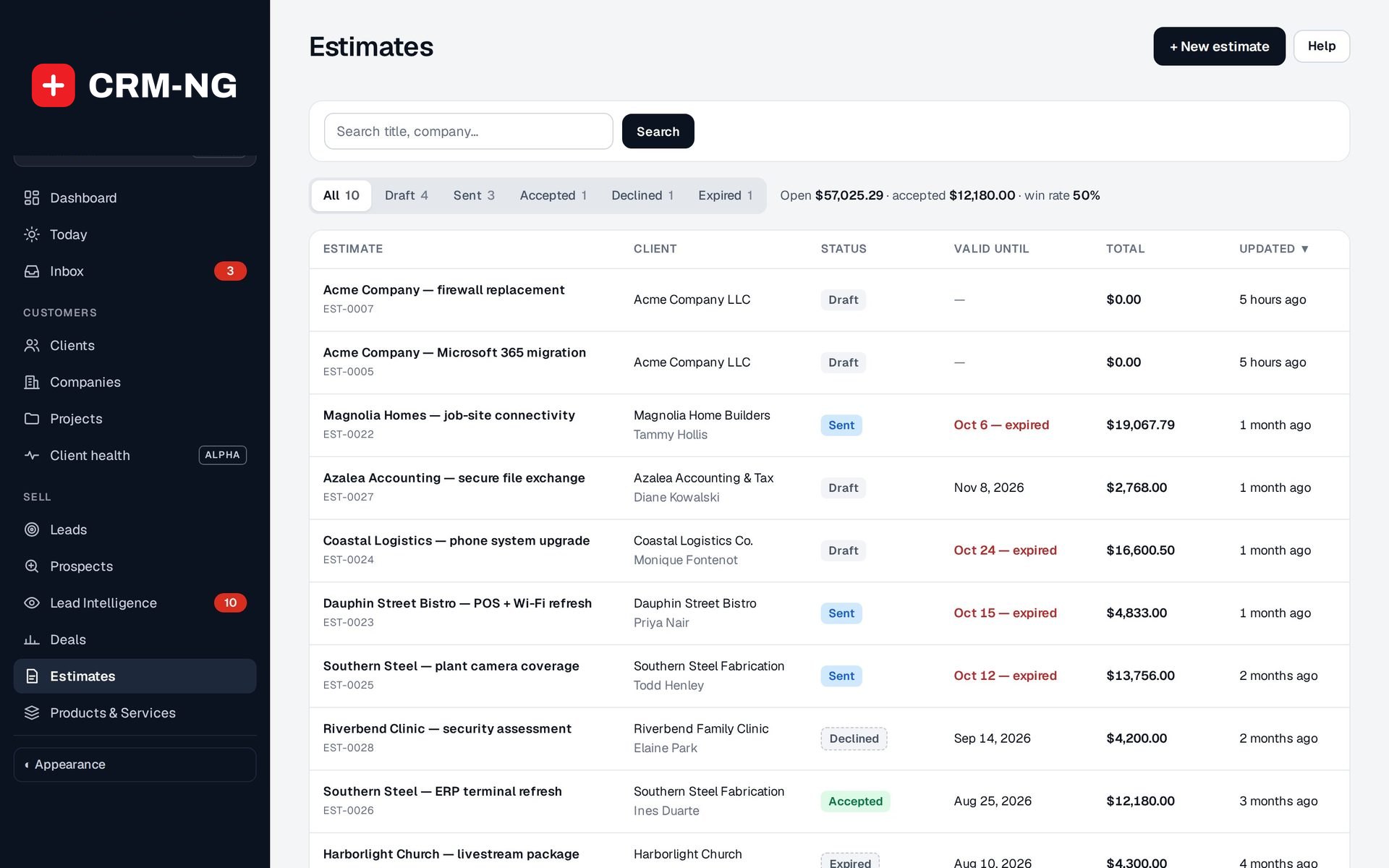
Build an estimate from Products & Services, apply discounts and tax, and send it as a PDF on your letterhead. The client accepts it in the portal.
- Statuses: Draft, Sent, Accepted, Declined, Expired
- Validity period and default terms set once
- Preview the estimate exactly as the client will see it
- Open value, accepted value and win rate above the list
-
Estimate to invoice in one click
An accepted estimate becomes an invoice with its lines intact.
- Convert to invoice appears once the estimate is accepted
- The new invoice opens as a draft for a final check
- Duplicate an estimate to quote a similar job
-
Prospect lists
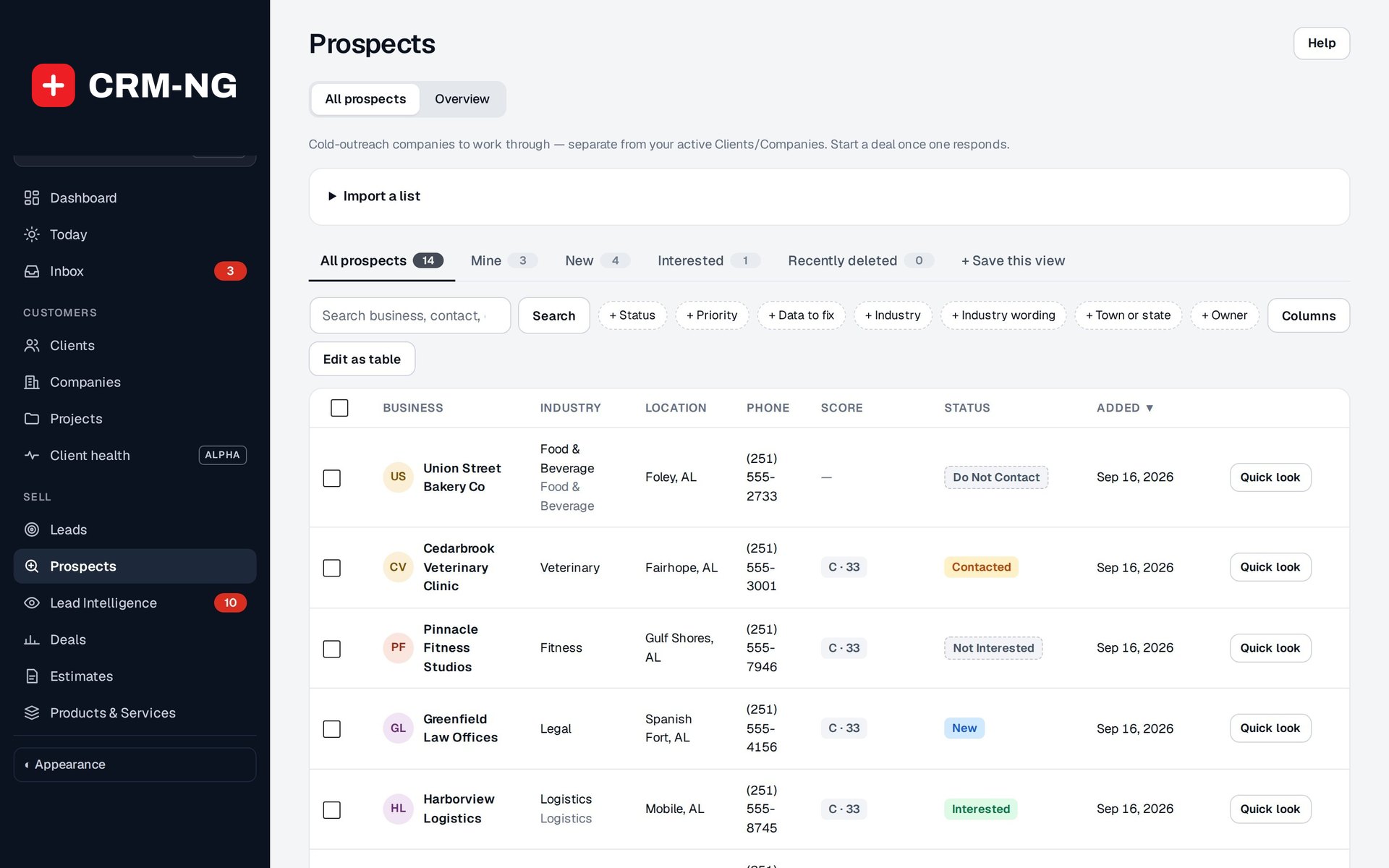
Import businesses from a spreadsheet with duplicate checks, give them a score, and work through them before they become customers.
- CSV or XLSX import with a check for businesses you already have
- A 0 to 100 score and an A, B or C priority
- Edit as table: paste from a spreadsheet, fill down, find and replace, undo
- Convert to lead or Start a deal when a business responds
-
New leads reach the right person
Lead routing assigns each new lead by rules you set, and speed to lead reminds the owner before an enquiry waits too long.
- Rules on source, state, zip prefix, email domain or company words
- One person, take turns, or whoever has the fewest open leads
- People on approved leave are skipped (with HR)
- Reminder at the target time, then escalation to people you choose
-
Products & Services
One shared price list for estimates, invoices and deals, so descriptions and prices are never retyped.
- Name, category, price, cost, tax treatment, audience and recurrence
- Mark an item inactive to retire it without touching old documents
-
Vendors and referral partners
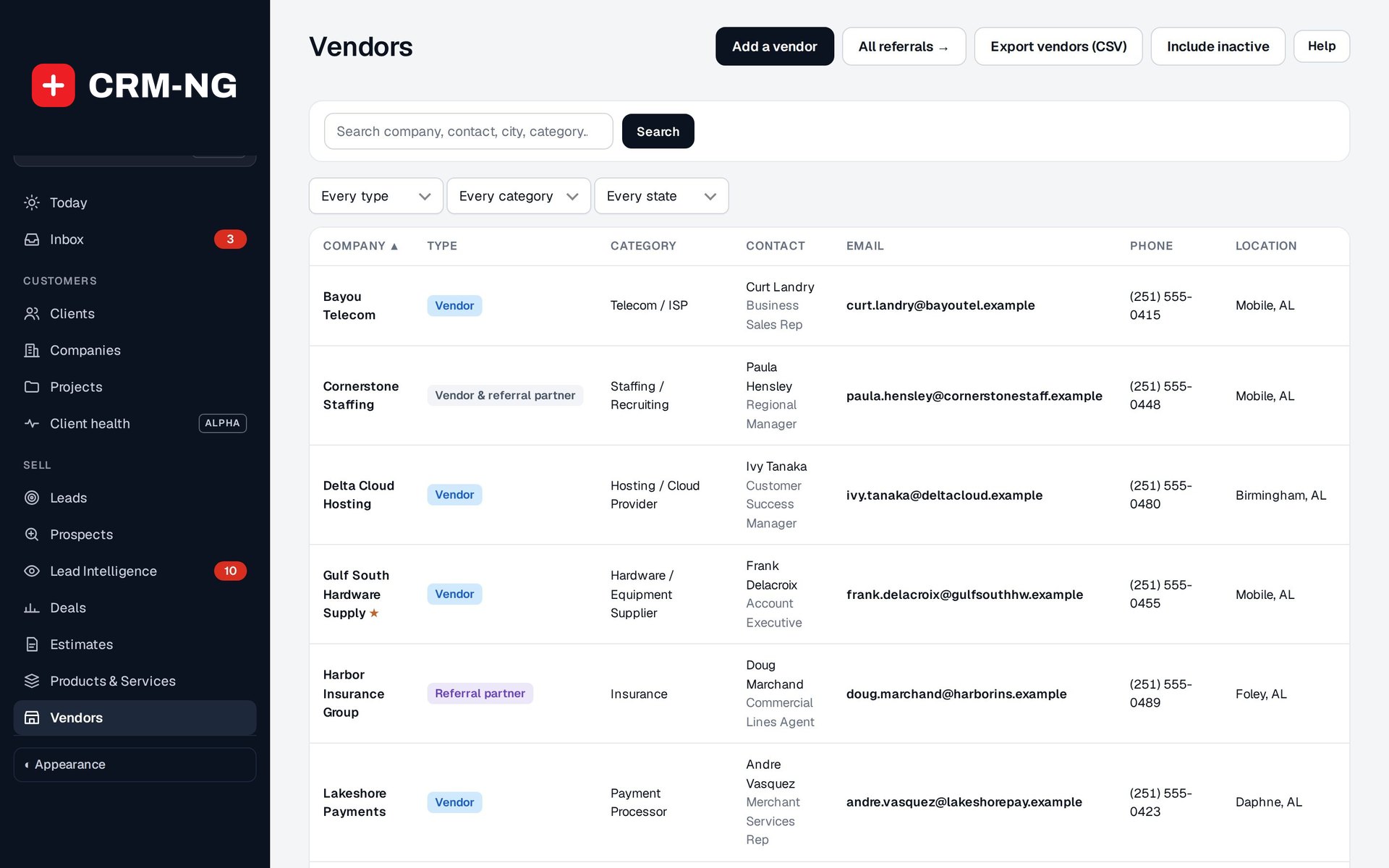
Keep suppliers and the people who send you work, with every referral recorded.
- Each one a vendor, a referral partner or both, with category and preferred flag
- Log a referral or outsourced work against a client and deal
- Export vendors to CSV
See it in action
Go deeper
- ProspectsImport target businesses without duplicates, let the score rank them, clean the data in a spreadsheet-style table, and see which lists actually turn into leads.Read more →
- Quotes and estimatesBuild an estimate from your price list or a deal, send it as a branded PDF, let the client accept it in the portal and convert it to an invoice with every line intact.Read more →
Who it is for
-
An IT provider or MSP
Quote hardware and projects from one price list, track renewals and upgrades as deals on each client company, and import local businesses as prospects for outreach.
-
A marketing or design agency
Keep every pitch on the board with its decision maker and champion, send the proposal as an estimate and convert it to the first invoice when it is accepted.
-
A trades or construction business
Price jobs from your list of services and materials, see which quotes have expired before the client goes elsewhere, and record which suppliers and partners send you work.
-
A consultant or professional-services firm
Follow every opportunity with a next step and due date, forecast what is likely to close this quarter, and route new enquiries to the right partner automatically.
Works with the rest of CRM-NG
- CRM
Deals and estimates are linked to the lead, client or company and show in their Transactions tab and timeline; prospects convert into leads and companies.
- Accounting
An accepted estimate converts into a draft invoice with its lines, and vendors are the suppliers chosen on purchases and bills.
- Marketing
Lead Intelligence's ideal-customer profile and website visits feed the prospect score, and won and lost deals help it suggest better scoring weights.
- Project Manager
A won deal can be linked to a project, so the delivery team starts from the same customer and scope.
Questions
Can clients accept a quote online?
Yes. Sent estimates appear in the client portal with their PDF. The client ticks to accept the quote and its terms, or declines with a note, and the quote's owner is notified either way.
How is the weighted forecast worked out?
Each deal's value is multiplied by its probability. A $10,000 deal at 30% adds $3,000 to the weighted forecast. Deals without an expected closing date can be missing from date-based forecasts.
Will importing a prospect list create duplicates?
No. Each row is checked against the prospects you already have by earlier ID, phone, website, name and town, and email. You decide what to do with differences and look-alikes before anything is imported, and the whole import can be undone.
Does winning a deal create an invoice automatically?
No. The deal records the sale; you send an estimate, and when it is accepted you convert it to an invoice and check the draft before issuing it.
Are prospects mixed in with my clients?
No. Prospects are a separate list of organizations you plan to approach. They only join your leads and companies when you convert them.
Which currency do quotes use?
New deals and estimates start in the home currency set in your company details.
See Sales running on your own data.
Every module runs on CRM-NextGen Cloud: we set it up and run it for you. Beta members get the first invites and hear pricing first.