
Knowledge Base
Write it down once, for your team, your clients or the world.
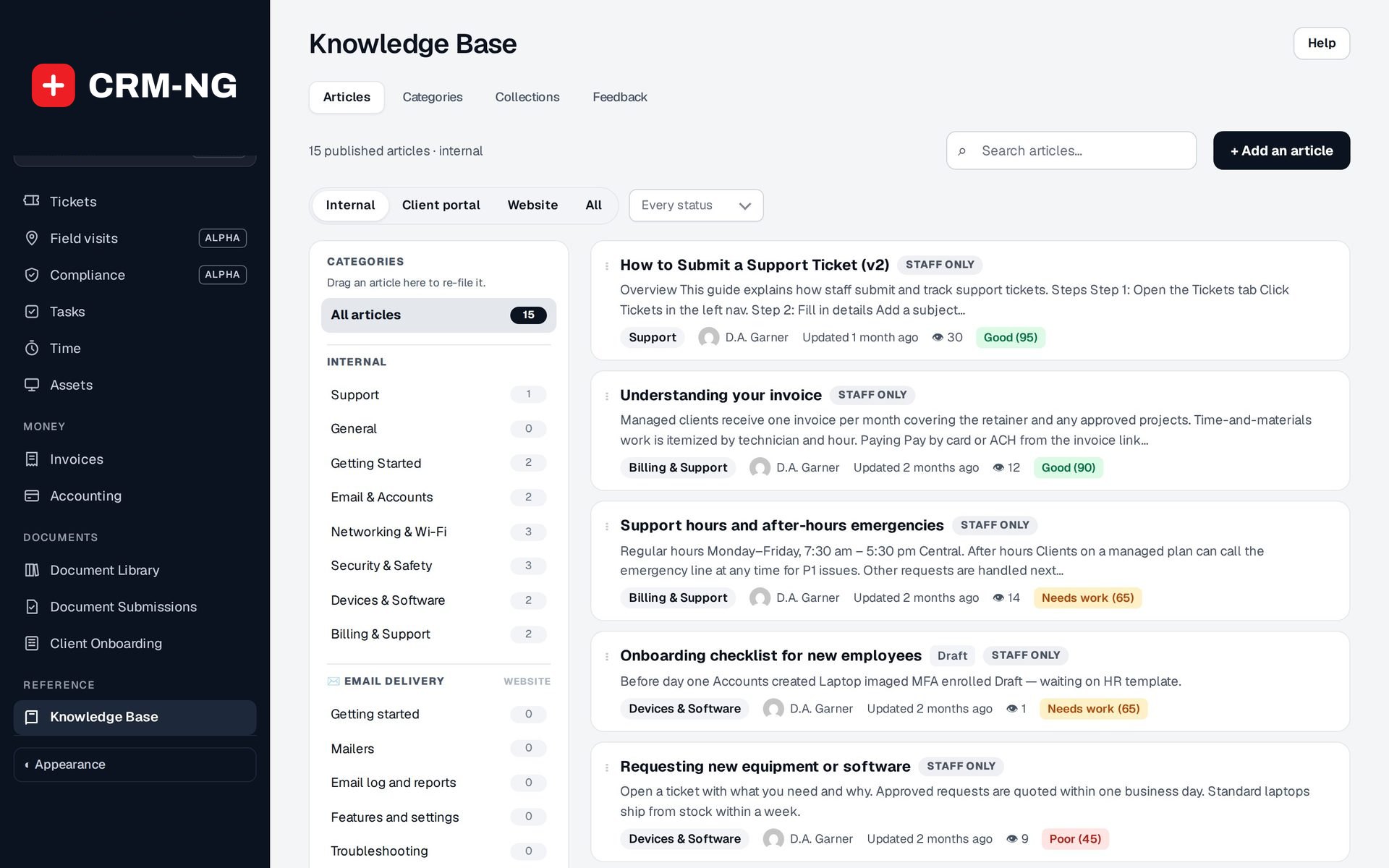
Staff, client and public articles in a structured editor, collections published as public documentation, and a quality score that shows what needs work. For any team that answers the same questions twice.
- Staff, client and public articles
- A structured editor with templates
- Public collections with search
- "Was this helpful?" feedback
- Quality score and Git sync
Why it matters
The fix for the printer driver lives in one technician's head. The how-to for the new phone system is a Word file on someone's desktop, the client FAQ is an old web page nobody updates, and half your tickets ask questions you have answered a dozen times. When the person who knows is off sick, the client waits. Nobody can tell which notes are still right, and nobody knows which ones clients actually read.
-
Fewer repeat tickets
Clients see matching articles while they type a new ticket in the portal, so the simple questions get answered before they reach your queue.
-
Knowledge that stays with you
Procedures, fixes and policies live in one place your whole team can search, not in one person's memory or inbox.
-
Articles that keep getting better
Reader feedback, view counts and a quality score point you to the articles that are out of date, too thin or not helping.
How it works
-
Set up categories and collections
Group articles into categories such as Email & Accounts or Networking & Wi-Fi, and create public collections for the documentation you want on the web.
-
Write from a template
Start from a How-to guide, FAQ, Troubleshooting, Setup guide or Policy / process template, add steps, notes and screenshots, then choose who may read it: staff, clients or the public.
-
Publish where people look
Staff find articles on the Knowledge Base board, clients see theirs in the portal and in suggestions on the new-ticket form, and public articles appear in your online documentation with search.
-
Improve what isn't working
Check the Feedback report and the quality score each week, fix the articles marked Needs work or Poor, and mark reviewed articles with today's date.
What Knowledge Base does
Support teams and anyone answering the same questions twice: IT providers, professional firms, trades and field businesses, clinics and agencies.
-
Three audiences, one library
Every article is Staff only, Clients (portal) or Public, and only reaches the people it is meant for.
- Board filter: Internal, Client portal, Website or All
- Client articles appear only when published and marked for clients
- Public articles live in a collection
- A failed public save keeps the article's previous visibility
-
An editor that keeps things consistent
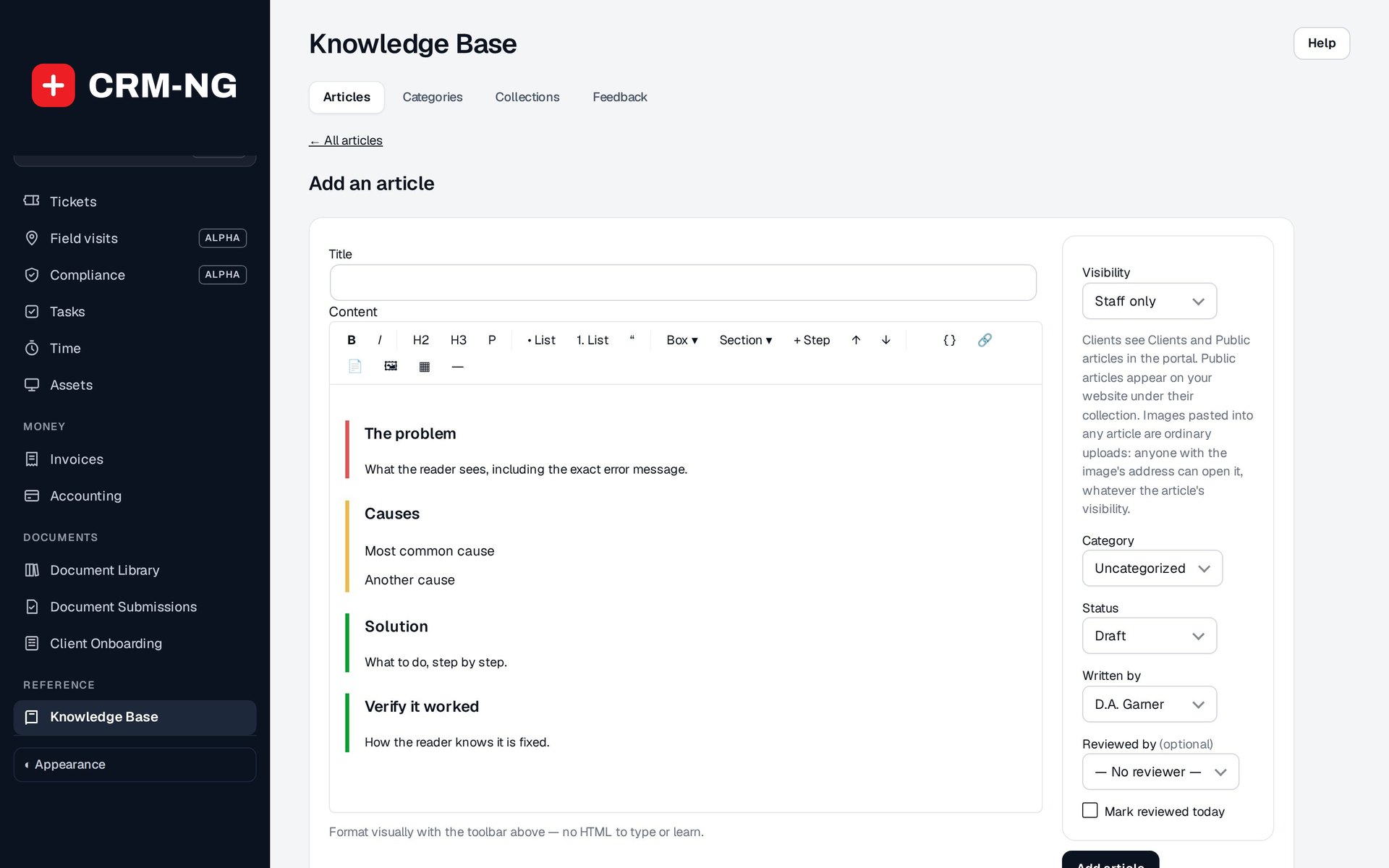
A structured editor with boxes, sections and numbered steps, so every article reads the same way without anyone touching code.
- Templates: How-to guide, FAQ, Troubleshooting, Setup guide, Policy / process
- Boxes: Note, Tip, Important, Warning
- Sections: Problem, Causes, Solution, Before you start, Steps, Verify
- Paste or drag images in; code blocks with a copy button
-
Organised the way you think
Categories you can reorder and articles you can drag from one category to another, with search across the whole library.
- Drag an article onto a category to re-file it
- Categories grouped by collection
- Links to other articles, with a warning when a public article links to a private one
- Related articles suggested from shared categories and tags
-
Public documentation
Publish collections as a documentation site with search, categories, a table of contents and related articles.
- Collections, categories and article pages with search
- Last updated, Written by and Reviewed by on every article
- Listed for search engines, with descriptions and structured data
- Table of contents collapses on phones
-
Help inside the client portal
Signed-in clients can read the articles you share with them, and the new-ticket form suggests matching articles as they type.
- Suggestions drawn only from published client articles
- A guessed link never shows a draft or a staff-only article
- Clients read the article without leaving the portal
-
Feedback that improves articles
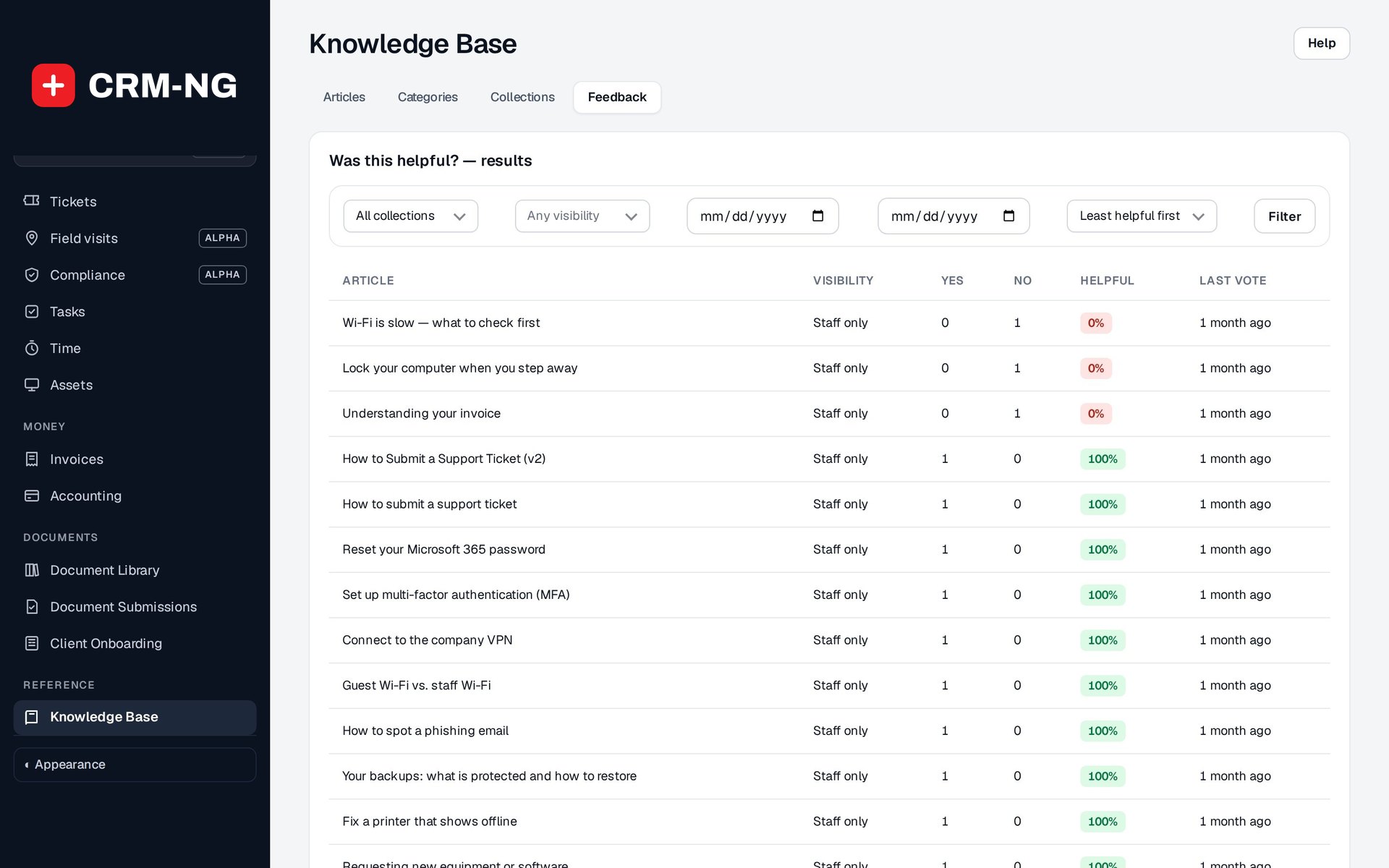
Readers say whether an article helped, and what was missing, so you know what to fix rather than guessing.
- Yes / no votes and % helpful per article, least helpful first
- "What was missing?" comments with Mark handled
- At least 5 votes and under 60% helpful puts an article in Needs attention
- One vote per signed-in person
-
A quality score
Each article gets a score out of 100 and a label (Good, Needs work or Poor) with the reasons, worked out from the article itself.
- Flags very short articles and articles with no headings
- Flags articles with no tags or no related articles
- Flags articles not updated within your review period (180 days by default)
- Low reader ratings lower the score
-
Credibility built in
Show who wrote an article, who checked it and when, so staff and clients know they can trust it.
- Written by and an optional Reviewed by, both from your team
- Mark reviewed today
- Minor edit keeps the Last updated date unchanged
- Job title and photo shown on articles
-
Git sync
Keep articles as Markdown in a GitHub repository and publish them from there. It is a one-way publish: changes are made in GitHub, never sent back.
- Checks twice a day, or Sync now
- Folders you list publish into a public collection
- Unchanged files are skipped; each run reports added, updated and failed files
- Private repositories supported, with the access token stored encrypted
Who it is for
-
An IT provider or MSP
Technicians keep internal fixes and procedures as staff articles, clients get how-tos for password resets, Wi-Fi and email in the portal, and the new-ticket form answers the easy questions before they become tickets.
-
A professional-services firm
An accounting or law firm writes client guides on uploading documents, paying invoices and what to bring to a meeting, and keeps its internal processes as staff articles that new hires can follow.
-
A trades or field business
Crews look up installation steps and safety notes, and customers find care and maintenance guides on the public documentation pages.
-
A software or product company
Developers write documentation in Markdown on GitHub, Git sync publishes it to a public collection, and support staff track which pages readers find unhelpful.
Works with the rest of CRM-NG
- Web Integration & Portals
Articles marked for clients appear in the client portal, and the portal's new-ticket form suggests matching articles as the client types.
- Service Desk
When the same question keeps arriving as tickets, the answer becomes an article, and clients see it in their portal before they open the next ticket.
- Documentation Vault
The Documentation Vault uses the Knowledge Base editor for each client's runbooks and procedures, so internal articles and client documentation are written the same way.
- Document Manager
Articles explain how things work; agreements and policies that need a signature go through the Document Manager, and clients find both in the same portal.
Questions
Can clients see our internal articles?
No. Each article is Staff only, Clients (portal) or Public. Clients only ever see published articles marked for clients, and the public only sees articles in a public collection. New articles are not shown to clients unless you choose to.
How long does it take to get started?
You can write your first article in minutes from a template. A good start is the handful of questions you answer most often, then a category at a time.
Can we bring in documentation we already have?
If your documentation is in Markdown on GitHub, Git sync can import it, publishing listed folders into a public collection. Other content can be pasted into the editor, including images.
Does the quality score check whether an article is correct?
No. It looks at signals such as length, headings, tags, how recently the article was updated and what readers said. It points you to articles worth reviewing; a person still checks that the answer is right.
Who can publish to our public documentation?
Only people with the publishing right can make an article public, manage collections, or change, move or unpublish a public article. Other staff can still write and edit staff and client articles.
If we delete a file in GitHub, does the article disappear?
Not automatically. Git sync is a one-way publish from GitHub that adds and updates articles; remove the article in the Knowledge Base as well when you retire a page.
See Knowledge Base running on your own data.
Every module runs on CRM-NextGen Cloud: we set it up and run it for you. Beta members get the first invites and hear pricing first.