
Enterprise
Sign-in security and an audit trail for firms that need to prove it.
Passkeys and security keys, two-step sign-in policies, lockouts and bans, roles and access, the full activity log and service accounts. For firms with compliance obligations and the IT providers who look after them.
- Passkeys and security keys
- Two-step sign-in policies
- Lockouts and IP bans
- Roles matrix
- All Activity and service accounts
Why it matters
Your CRM holds client contacts, invoices, tickets and, for an IT provider, the keys to client networks, yet everyone signs in with a password they reuse elsewhere. You can't say who has two-step sign-in turned on, whether someone is guessing passwords right now, or who changed a record last Tuesday. An insurer or a client's auditor asks, and you have no answer.
-
Accounts that are hard to steal
Require two-step sign-in or passkeys by role, so a leaked password on its own no longer gets anyone in.
-
Attacks stopped early
Repeated failed sign-ins lead to lockouts and IP bans, and you can see who is trying to get in.
-
Answers when someone asks
One activity log across every module, and a security log of every sign-in, show who did what and when.
How it works
-
Set the policy
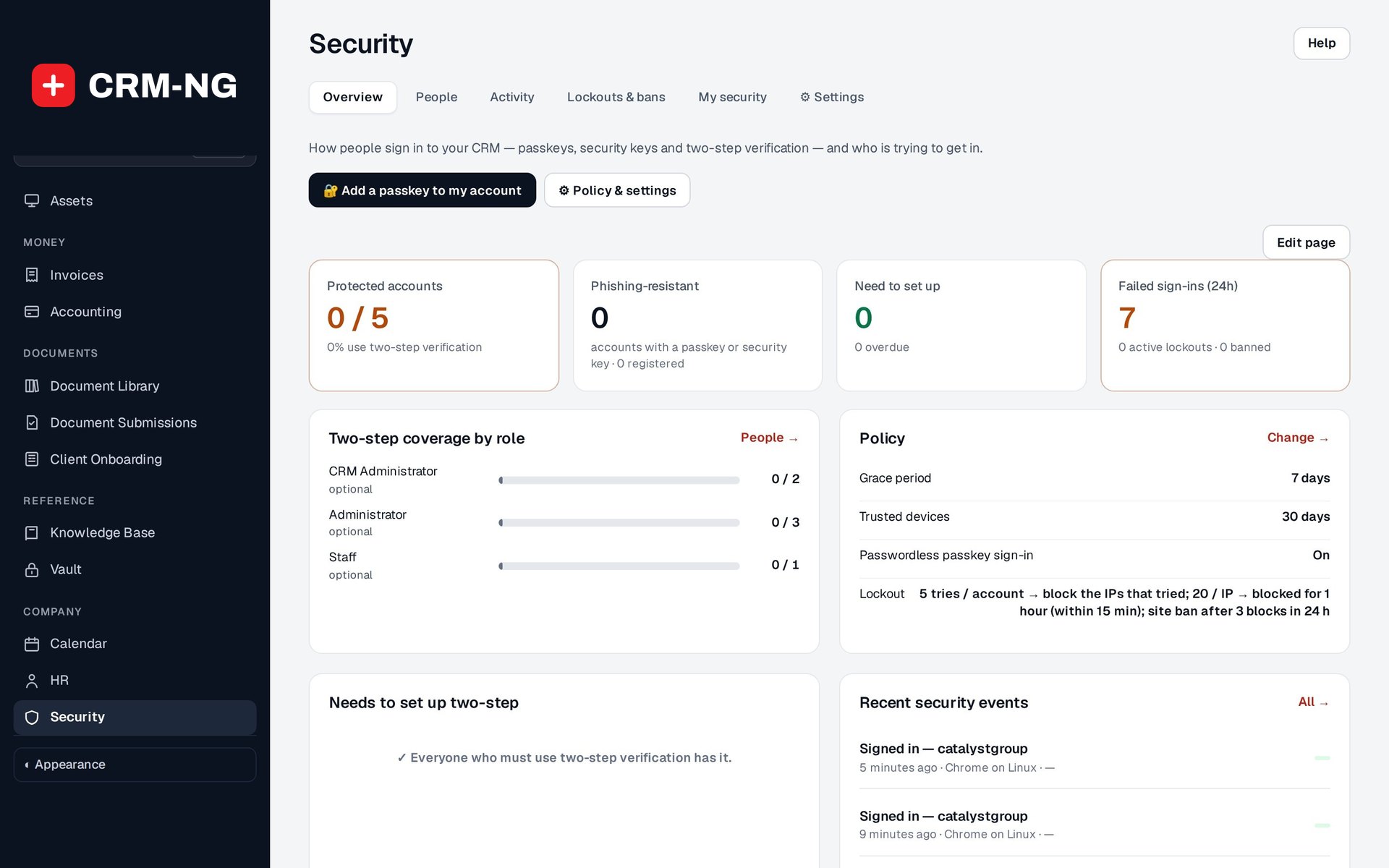
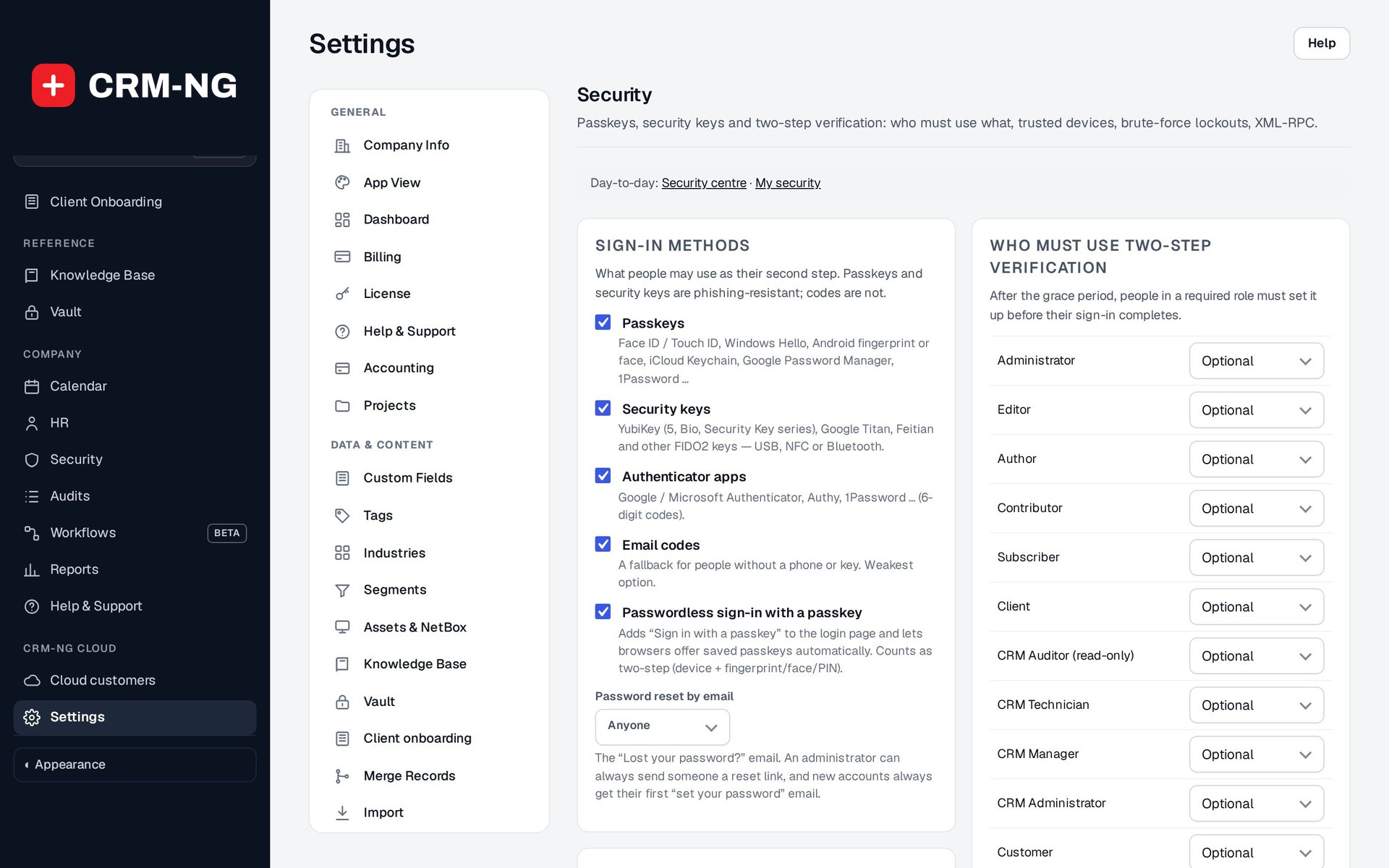
In Settings → Security, choose which sign-in methods are allowed, which roles must use two-step verification or a passkey, the grace period and how long a device stays trusted.
-
People enrol themselves
Each person opens My security and adds a passkey, a security key or an authenticator app, then saves their backup codes. Once the grace period is over, anyone in a required role must set up a method before their sign-in completes.
-
Watch the Security overview
See how many accounts are protected, who still needs to set up, failed sign-ins in the last 24 hours and active lockouts and bans.
-
Investigate and answer
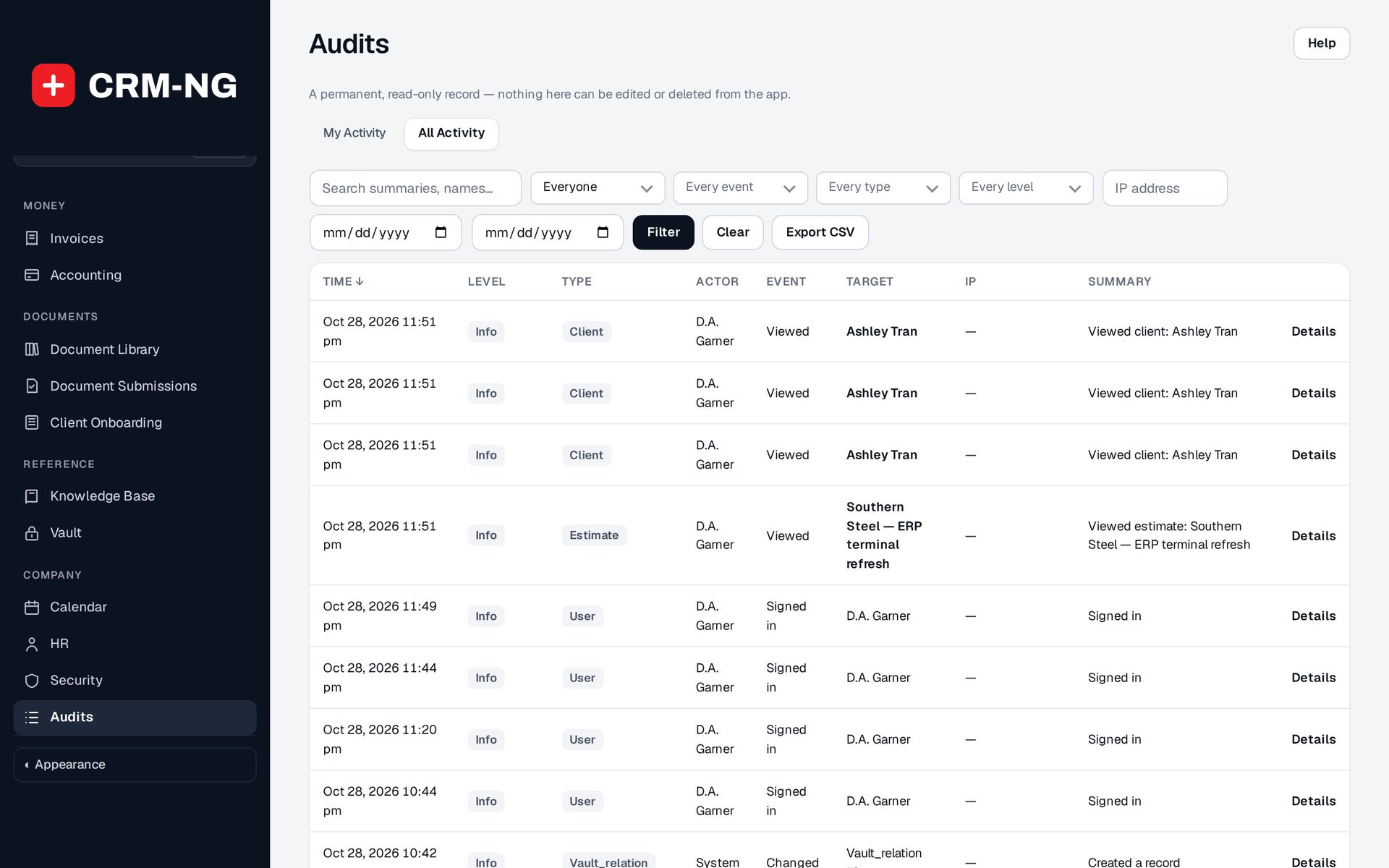
Use Security activity for sign-ins and All Activity for changes to records, and help a locked-out person with a reset, a grace period or an unlock.
What Enterprise does
Firms with compliance obligations and IT providers, and any business that wants to know who signs in and what they change.
-
Passkeys and security keys
Sign in with Face ID, Touch ID, Windows Hello or a hardware key.
- Device and password-manager passkeys
- FIDO2 security keys
- Phishing-resistant: they only work on your real sign-in page
- Possible cloned keys are blocked and logged
-
Two-step policies
Require two-step sign-in by role, with a grace period to set it up.
- Per role: no extra step, any second factor, or a passkey required
- Authenticator app codes, email codes and 10 backup codes
- Grace days and a trusted-device period (0 turns it off)
- "Add a second way to sign in" prompt for anyone with only one method
-
Lockouts and bans
Slow down guessing and block repeat offenders.
- Failed sign-ins counted per IP address and per account
- Account lockout, 10 minutes by default
- Ban an IP or range from the whole site, for a set time, with a reason
- Allowlist for your own office addresses; coordinated-attack detection
-
A roles matrix
Decide exactly what each role can see and do.
- Roles: CRM Auditor (read-only), CRM Technician, CRM Manager, CRM Administrator
- Separate permissions for viewing, managing, administration and audit viewing
- Who can see All Activity, set in Settings → Access
- Two-step requirement set per role
-
All Activity
One audit trail across every module, with who did what and when.
- Everyone's activity, not just your own
- Filter by person, action, record and date
- Access limited to the people you choose
- Pay details still follow HR pay permissions
-
Security activity
Every sign-in, failed attempt, lockout and change to how people sign in, kept for 180 days.
- Filter by event, username and IP address
- Most failed sign-ins in the last 7 days, by IP
- Emails to people when a passkey, authenticator or two-step setting changes on their account
-
Help without weakening security
Get a locked-out person back in without switching protection off for everyone.
- Reset someone's two-step enrolment, grant a grace period or unlock their account
- Show a one-time link so they set their own password; admins never see it
- Sign them out everywhere now
- Review and revoke trusted devices and sessions
-
Service accounts
Give integrations their own limited, revocable access.
- CRM Service Account (automation) role
- Flag an existing account as a service account in Settings → Access
- Kept out of owner and assignee pickers, staff filters and team capacity
- No HR permissions unless you grant them
-
Protected secrets
The secrets behind two-step sign-in are stored encrypted and handled carefully.
- Authenticator-app secrets encrypted at rest
- Sign-in code emails never put the code in the subject
- Backup codes can be copied, printed or downloaded, and are never stored readable
Who it is for
-
An IT provider or MSP
Technicians who can reach client networks through the CRM must sign in with a passkey, failed sign-ins are locked out, and every change is in All Activity when a client asks.
-
A clinic or practice
Require two-step sign-in for everyone who handles patient or client records, and keep the sign-in and activity history for reviews.
-
An accounting or financial firm
Show auditors and insurers that every account uses two-step verification, that access follows roles, and that changes to client records are logged.
-
A growing team with integrations
Connect automations through their own service accounts, kept out of staff lists, instead of borrowing a person's login.
Works with the rest of CRM-NG
- CRM
Changes to clients, companies and other records appear in All Activity, and service accounts are kept out of the people pickers on those records.
- HR
An employee record can show that person's Login Security, and suspending sign-in is its own offboarding step alongside setting them to terminated; HR pay details stay behind HR pay permissions in All Activity.
- Documentation Vault
Accounts that can open client vaults are protected by passkeys and two-step sign-in, and vault reveals and access changes join the audit trail.
- Compliance
Assessments ask your clients about multi-factor sign-in, log-in monitoring and access reviews; Enterprise gives your own team those controls inside CRM-NG.
Questions
What if someone loses their phone or security key?
They can sign in with one of their backup codes, or an administrator can verify who they are, reset their two-step enrolment or grant a grace period, and they enrol again. Everyone is prompted to add a second method so one lost device doesn't lock them out.
Can administrators see or set people's passwords?
No. An administrator can show a one-time link that lets the person choose their own password, and can sign them out everywhere. The administrator never sees the password.
Will turning on two-step sign-in lock my team out?
Not straight away. You set a grace period during which people sign in as usual and set it up from My security; only after it ends must they enrol before their sign-in completes. Test the policy with one role first.
Which devices work with passkeys?
Phones, tablets and computers that support passkeys, such as Face ID, Touch ID and Windows Hello, plus password managers that store passkeys and FIDO2 hardware security keys.
How long is security history kept?
Security activity (sign-ins, failures, lockouts and changes to sign-in methods) is kept for 180 days. All Activity records changes across modules and can be filtered by person, action, record and date.
Does an activity log prove everything that happened?
It shows the events CRM-NG recorded and the details captured with them. It is a strong starting point for an investigation, not a complete forensic archive.
See Enterprise running on your own data.
Every module runs on CRM-NextGen Cloud: we set it up and run it for you. Beta members get the first invites and hear pricing first.